How we work · Monitoring tools
LFW Activity Logs
See who changed what inside WordPress, when they changed it, and what was different afterward.
Named changes
Connect an action to the WordPress user, site, object, and time.
Content and metadata
Record changes to the page itself and the post metadata behind it.
One operational record
Investigate activity alongside requests, monitoring, and public-page captures.
“The page changed” is only the beginning
A visible change might come from the block editor, a custom field, an SEO setting, a template option, or an integration writing post metadata. A screenshot can show the result, but not who made the change or which stored value produced it.
LFW Activity Logs is a hosted service managed by LFW. A lightweight connector plugin on the WordPress site records important activity and securely sends it to the searchable timeline in the Client Portal.
The WordPress connector is included with the Web Operations Retainer for managed WordPress sites. Drupal support is coming soon.
See the working product
These screens show the real LFW Client Portal after the connector recorded content and post-metadata changes from a local WordPress installation. Meridian Parks Alliance is a fictional demonstration organization.
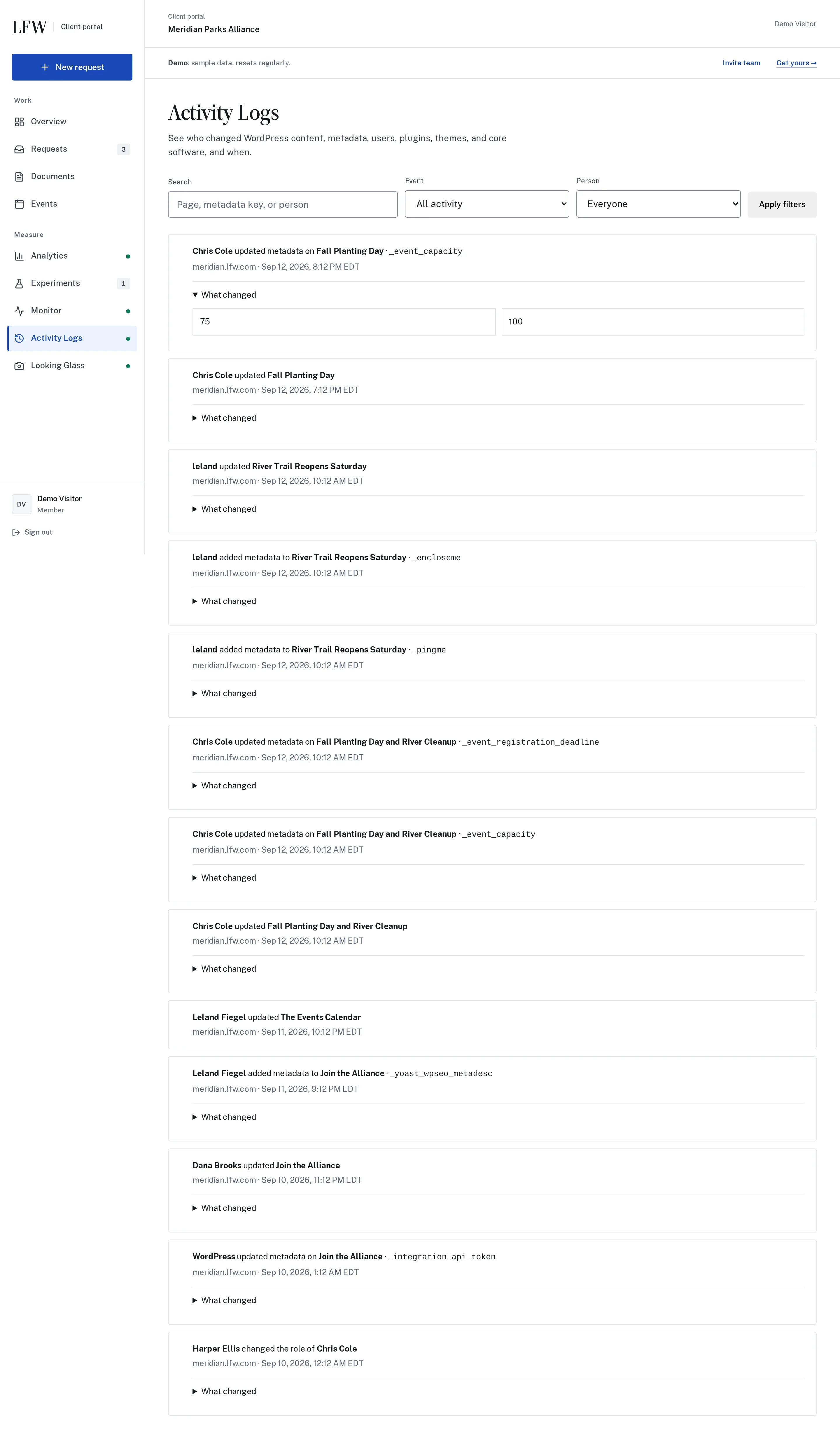

Enlarge to view the full screenshot.
What the first release records
- Pages, posts, and custom post types created, edited, published, or deleted
- Changes to titles, content, excerpts, slugs, status, and parent relationships
- Post metadata added, updated, or deleted, including the metadata key and its before-and-after value
- Users created, updated, deleted, or assigned a different role
- Plugins activated, deactivated, or updated
- Themes switched or updated and WordPress core updated
Post metadata is part of the change
WordPress stores much more than the main editor content in a post record. Custom fields, SEO titles, event details, page-builder settings, relationships, and integration state can live in post metadata.
When metadata changes, the log records:
- The post or page it belongs to
- The metadata key
- Whether the value was added, updated, or deleted
- The previous and new value
- The WordPress user and timestamp associated with the action
Known credential, session, payment, authentication, nonce, and API-key fields are redacted. The timeline still records that the field changed without copying the secret into another system.
Built for investigation, not surveillance
The timeline answers operational questions: Was this an approved edit? Did an update coincide with the failure? Was the underlying custom field changed even though the page content was not?
- Filter by event type or person
- Search by page title, metadata key, or actor
- Expand an event to inspect before-and-after values
- Keep retries idempotent so a delivery retry does not duplicate the history
- Associate the activity with the correct client and site
How it fits with the other records
- Activity Logs
- What happened inside WordPress, and who did it.
- Looking Glass
- What changed on the public page, including visual and structural differences.
- Monitor
- What failed, weakened, or needs technical investigation.
- Requests
- Why the work was requested, what was agreed, and what LFW reported back.
Delivery and security
The connector queues events on the WordPress site, sends them to LFW’s hosted service in signed batches, and retries a failed delivery. It does not provide a separate activity-log dashboard inside WordPress.
The site credential stays on the server. LFW rejects unsigned, stale, oversized, or incorrectly keyed submissions, and Client Portal permissions control who can read the resulting timeline.
Activity Logs is an operational history, not a backup. WordPress revisions and hosting backups remain the tools for restoring content.
See it pointed at your own site.
Twenty minutes, no sales pressure. Or start with the free audit and get a real first pass on your site today.