How we work · Monitoring tools
LFW Analytics
See what visitors do, where journeys end, and what to improve next. First-party analytics, with optional Replay for your website.
LFW Analytics · Our own traffic
The dashboard, with real data
This is not a screenshot. LFW.com's own last 30 days, rendered from the
same limited public endpoint anyone can read: /api/public-stats.json
. Aggregates only, our own site only, counting since Aug 10, 2026.
Measured through . Refreshed in the background about every five minutes. High-volume browser-like requests are retained and reported separately as suspected automation.
Show daily totals
| Day | Human page views |
|---|---|
| Aug 27 | 200 |
| Aug 28 | 304 |
| Aug 29 | 310 |
| Aug 30 | 247 |
| Aug 31 | 287 |
| Sep 1 | 336 |
| Sep 2 | 315 |
| Sep 3 | 498 |
| Sep 4 | 243 |
| Sep 5 | 264 |
| Sep 6 | 430 |
| Sep 7 | 292 |
| Sep 8 | 0 |
| Sep 9 | 400 |
| Sep 10 | 643 |
| Sep 11 | 648 |
| Sep 12 | 741 |
| Sep 13 | 1040 |
| Sep 14 | 645 |
| Sep 15 | 635 |
| Sep 16 | 607 |
| Sep 17 | 867 |
| Sep 18 | 575 |
| Sep 19 | 492 |
| Sep 20 | 1131 |
| Sep 21 | 665 |
| Sep 22 | 549 |
| Sep 23 | 590 |
| Sep 24 | 866 |
| Sep 25 | 117 |
Most-read pages
| / | 5219 |
| /blog/ | 773 |
| /fr/blog/ | 527 |
| /es/blog/ | 516 |
| /book/ | 428 |
| /es/agendar/ | 224 |
| /fr/reserver/ | 219 |
| /about/ | 195 |
Where visitors came from
| direct / bookmarks | 9468 |
| internal | 4380 |
| google.com | 715 |
| other links | 332 |
| linkedin.com | 125 |
| t.co | 25 |
| facebook.com | 11 |
| duckduckgo.com | 5 |
Bots and suspected automation
| automation | 40331 |
| other bots | 23014 |
| search engines | 10579 |
| SEO tools | 4075 |
| scripts | 1654 |
| AI crawlers | 1633 |
| suspect UAs | 483 |
| link previews | 208 |
| suspected automation | 70299 |
AI reads: / (157), /blog/ (86), /es/blog/ (82), /fr/blog/ (79), /book/ (60)
Our own traffic, measured by the same instrument clients get. Published, embarrassments included.
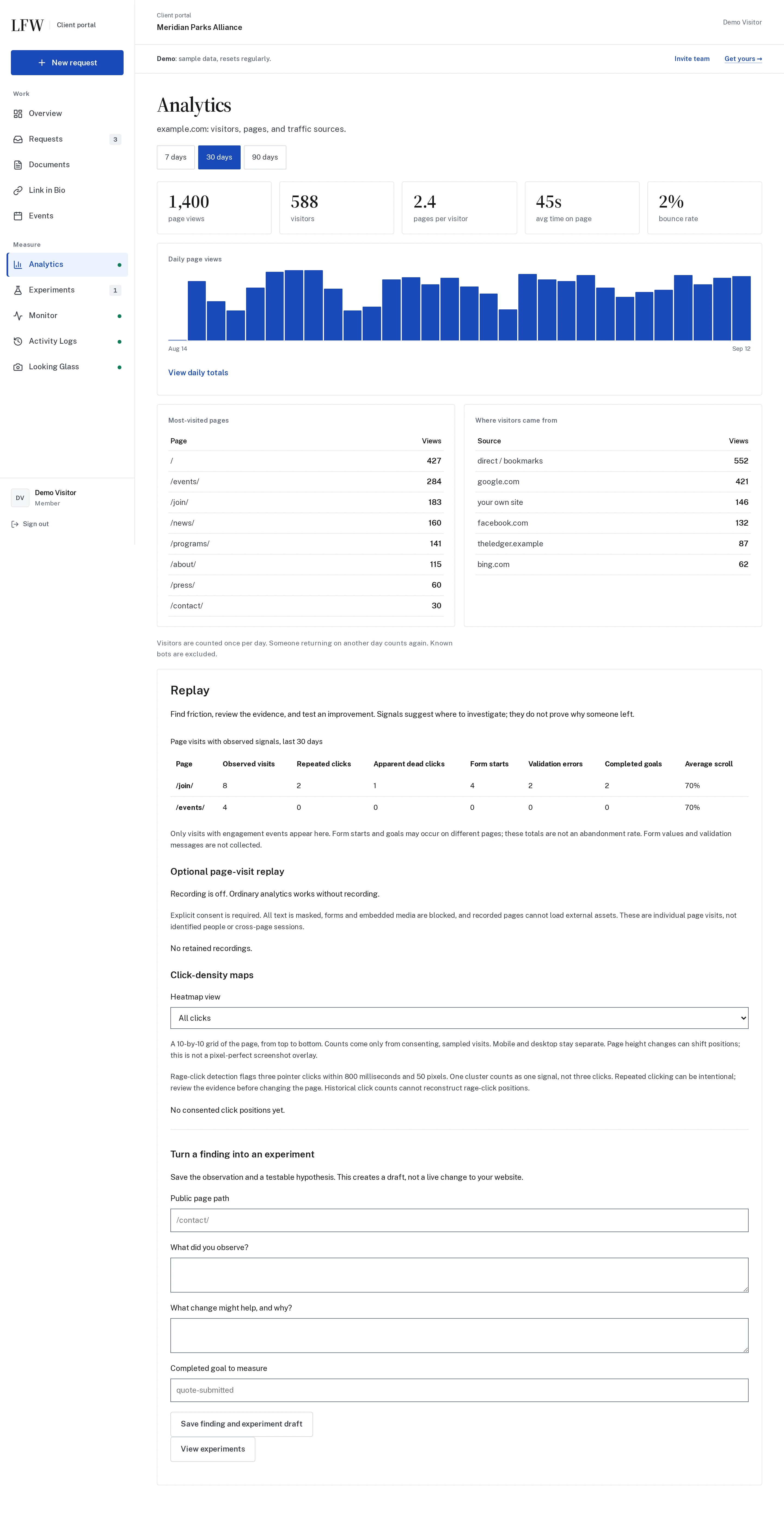

Enlarge to view the full screenshot.
Pages people use
See the pages receiving visits and the paths worth investigating.
Conversions that matter
Configure a task, then compare who clicked, completed, or did both.
Crawler activity
See automated traffic separately from visitor totals.
Replay · Optional with LFW Analytics
Understand your visitors beyond what they can tell you.
Don’t stop at a bounce rate. Follow a recorded visit from page to page, review the last captured action, and find patterns worth testing.
What did they actually do?
Watch navigation, scrolling, and clicks in order. See whether a visitor reached your service page, started a contact form, or completed a configured goal.
Where did the visit stop making progress?
Jump to a form start, a supported validation error, or the last recorded interaction. Use click-density maps and repeated-click signals to choose what to investigate.
What should we change next?
Turn an observation into an experiment draft. Test clearer copy, a different call to action, or a simpler form, then compare completed actions, not just clicks.
Built for your website, not just ours.
LFW sets up first-party collection on your domain, agrees which public pages and supported forms to measure, and makes the results available in your Client Portal.
Request a quote for Analytics with Replay, separately or alongside a Web Operations Retainer. We agree the setup, coverage, and review work before you commit.
The last recorded action is a clue, not proof of when or why someone left. Consent, coverage, and connection gaps can end a recording. Replay shows behavior, not a visitor’s thoughts.
Recording is opt-in; typed values and private areas are excluded. LFW.com replays can show verified public copy and approved images and fonts. Other customer sites currently keep all text masked. You choose the public pages, sampling, and retention period.
Measurement, privacy & scopeMeasurement, privacy & scope
The expensive part of analytics is the person who reads it
Google Analytics is free. The person who sits with it and says what the numbers mean isn't. Without that person, a dashboard produces nothing. LFW Analytics fills that seat: the measurement and what it means, from the same people who run the site.
The Anomaly Detector reads the numbers first
Every morning, LFW Analytics compares each day with the same weekday over the previous four weeks. A spike, a drop, a new crawler, a referring site that appeared from nowhere, or a page that suddenly moved gets written up in plain words in the day's note.
A spike too large to be readership is marked critical and becomes a task for the people who run your site. The collector is checked before the number is trusted, because a broken counter looks exactly like good news.
Server-counted traffic, first-party engagement
On sites LFW manages, pageviews are counted at the web server itself. A small first-party, cookieless beacon measures engagement such as scroll depth, time, CTA clicks, and signs of friction. No visitor profile is stored and no data is shared with an ad network.
On sites we don't host, the same small first-party snippet also counts pageviews. Still no cookies and nothing shared with a third-party analytics platform.
Measure the action, not just the page
A measurement task connects the choices people click with the forms they actually complete. The task can be configured later because the underlying action labels are retained.
- Compare two contact paths, downloads, registrations, donations, or other meaningful actions
- Count people who clicked, people who completed, and people who did both in that order
- Change the business question without replacing the tracker or discarding earlier click data
Friction, measured: rage clicks and dead clicks
Traffic counts tell you people came. Friction data tells you where the site fought them.
The beacon flags rage clicking (rapid, repeated clicks in the same spot) and apparent dead clicks on noninteractive elements. These are clues to investigate, not proof of frustration. Each event records which element, on which page.
Ordinary analytics does not make visual recordings. Optional Replay follows a visitor’s journey across enabled public pages after one opt-in in the current tab. Typed values and private areas are excluded, and recordings expire automatically.
Follow the journey, not just one page
See which recorded page came next, play the journey in order, or jump to a moment in its timeline. Form milestones show when a visitor started, encountered a supported validation error, or completed a configured goal, without revealing what they typed.
On LFW.com, playback can show verified public copy, static form labels and buttons, and approved images and fonts hosted by LFW. Unknown text is masked; form controls, private results, embedded media, and unapproved assets are excluded.
Other customer sites currently retain full text masking. Playback reconstructs recorded interactions; unrecorded pages are absent and time between page recordings is skipped. Earlier masked recordings stay masked.
From a finding to a useful experiment
Replay brings repeated clicks, apparent dead clicks, form starts, validation errors, and scroll depth into one investigation view.
- Find pages with signals worth reviewing, without treating a click pattern as proof of frustration.
- Review an available journey and its page and form-milestone timeline.
- Save an observation, proposed improvement, and completed goal as an experiment draft.
- Have LFW configure the test, then measure completed actions rather than clicks alone.
Recording is off by default. Owners choose public-page coverage, sampling, and a retention period of 7, 14, or 30 days. Private routes, including Admin and Client Portal, cannot be enabled.
Visitors can stop recording at any time. Consent expires after 30 minutes of inactivity or two hours, and Replay respects Global Privacy Control and Do Not Track. Journeys are not linked to contact records.
Stopping recording prevents new collection; it does not delete recordings already received. Existing recordings expire under the configured retention period. See the Replay privacy notice for deletion requests.
The crawler report Google Analytics won't give you
Most crawlers never run an analytics tag; the ones that do get filtered out. Either way, no report. Server-side measurement counts them: which AI companies read your site (GPTBot, ClaudeBot, Perplexity), plus the search engines and scrapers, what they read, and how often. "What is AI reading here" is a question boards ask now. This answers it with data.
How it works
- Where server access is available, LFW configures traffic measurement at the server. Engagement tracking and optional Replay also need a first-party browser snippet, which LFW sets up on the agreed pages
- On other sites: one small snippet in your existing theme, first-party on your own domain
- Ordinary traffic analytics uses no cookies or third-party data sharing, with a one-way, daily-rotating visitor hash. Optional Replay separately requires consent and uses a short-lived, tab-scoped journey identifier
- Your numbers live in your Client Portal, with no separate login and no account nobody remembers the password to
- Ordinary Analytics does not require an ad-network pixel. Optional advertising integrations are separate, with their own configuration and privacy controls in LFW Tag Manager
Pricing
Quoted to the scope of your site, as its own line item or within a Web Operations Retainer. Either way the number is in writing before anything starts.
Try it on your website.
Twenty minutes, no sales pressure. Or start with the free audit and get a real first pass on your site today.