LFW Activity Logger
A record of every change on your website.
Who signed in, who changed what and the value before and after. Each entry is chained to the one before it, so an edited or deleted entry shows.
Free plugin · built, not public yet
See it with sample data.
The log in the LFW account demo: a fictional parks alliance, its editors and their changes.
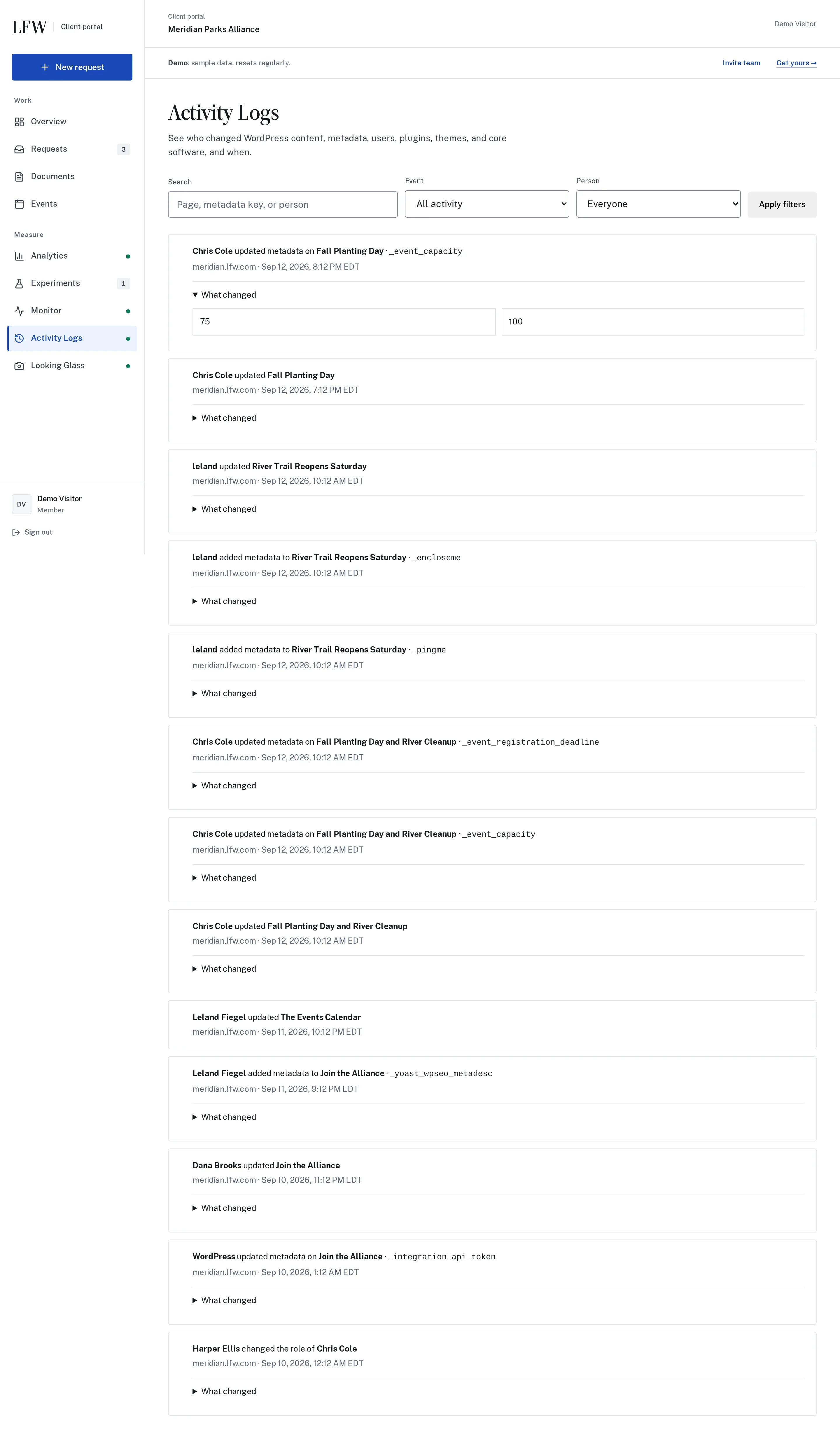

Enlarge to view the full screenshot.
What it records.
Each entry names the WordPress user and the time.
- Pages and posts Created, edited, published and deleted, with the title, content, status and custom fields before and after.
- Sign-ins Sign-ins, sign-outs and failed sign-ins. A flood of failures becomes at most four entries an hour.
- People and roles Users added, removed or given a different role, and passwords changed or reset. Never the password itself.
- Settings The site title, site address, who can register, the homepage and the other core settings, with the value before and after.
- Media, menus and categories Uploads and their alt text, menu items, categories and tags, widgets and comment moderation.
- Plugins, themes and updates Installed, activated, updated, edited or deleted, and every WordPress update.
How the record holds up.
A log an administrator can quietly edit is not a record. These are the parts that make changes show.
- Every entry is chained Each entry stores a SHA-256 hash of the entry before it. Edit one, slip one in or remove one, and the check names the first broken entry.
- An offsite copy When the site is connected to LFW, entries are copied off the site. Once an entry reaches LFW, nothing on the site can change or delete it.
- Checkpoints every five minutes If the log is cut back, the table dropped or the database restored from an old backup, your LFW account shows it.
- A quiet log is recorded If checkpoints stop for 30 minutes, LFW records that the log went quiet, and when it came back.
The chain shows tampering. It cannot prevent it: someone with database access can still delete the table. The offsite copy is what keeps the entries LFW already received.
When someone asks what happened.
A records request, an incident, an auditor or a council member asking who changed a page.
- Search and filter By title, person or field, and by date, action and type of thing changed.
- Before and after Open an entry to compare the value before the change with the value after it.
- Export as CSV The matching entries as a spreadsheet file, ready to hand over. Also from the command line with WP-CLI.
- Check the chain One button reports whether every entry is intact, or names the first one that is not.
What it never records.
- Passwords and secrets
- Credential, session, payment, nonce and API-key fields are redacted. The log records that the field changed, not its value.
- IP addresses
- Not recorded, for sign-ins or anything else.
- Anonymous comments
- New comments are not logged, so a stranger cannot flood the log. Moderation by a signed-in person is.
- Cron, caches and plugin internals
- Only a fixed list of core settings, so the log stays readable.
Other LFW products send it their events.
Activity Logger is where every LFW product's record goes, so one search covers the whole site. When both plugins are active on a site, each entry shows in the same log, with the same filters and export:
- LFW Editorial Workflow: each change proposed, submitted, approved, declined, returned, scheduled and published, with the page, the person and the step
- LFW Forms: each submission received (the form and entry number, never the answers) and each form created, edited or deleted
- LFW Backups: each completed snapshot, backup error and restore test, each restore from request to finish and each change to the bucket settings
- LFW Site Access: each single sign-on, each refused attempt (the email domain only), each account it creates or links, each role your groups set, settings changes and every break-glass sign-in
Each plugin works without Activity Logger, and a site without any of them still records everything listed above. A flood of form submissions becomes at most 60 entries an hour, then one summary.
What it needs.
- Your website
- WordPress 6.4 or newer, PHP 8.1 or newer.
- On its own
- Recording, the Tools > Activity log screen, search, CSV export, the chain and its check. Nothing is sent anywhere.
- Connected to LFW
- The offsite copy, checkpoints and the log in your LFW account. If the connection ends, the site keeps recording.
- Retention
- 365 days by default, up to 100,000 entries. Pruning old entries does not break the chain.
- License
- GPL-2.0 or later.
- Release
- Version 1.4.0 is built and tested in LFW’s repository and not public yet.
Ask about it for your site.
Tell us what you need to answer for: records requests, an audit or who changed a page. We reply within one business day.