For trade and professional associations
Membership, dues and your conference, without the spreadsheets.
Professionals apply with their credentials attached. Staff approve, collect dues and run the conference door.
- Applications with licenses and certificates attached
- A dues roll with card and check payments together
- Conference tickets with a member price
- A members-only directory each member controls
For the small staff behind the association.
Written for the executive director, the membership manager and the events manager.
- Trade associations
- Professional societies
- State associations of a profession
- Annual conference hosts
-
Today: An application arrives by email, and the license copy three days later.
With LFW: Applicants apply online and add documents while the application is open.
-
Today: Dues come by card and by check, and nobody has one total.
With LFW: Card and check payments sit on one dues roll, with totals.
-
Today: Conference registration lives in one tool, the member list in another.
With LFW: Conference tickets and the member list are in the same place.
-
Today: Checking who is a member before giving the member rate is done by hand.
With LFW: Members book at the member price; everyone else pays the public price.
How a membership year runs.
What members do, and what association staff see.
Members
-
Applies with credentials
Attaches a license or certificate, and can add documents while it waits.
-
Pays dues
Pays by card once approved, straight to the association’s Stripe account.
-
Registers for the conference
Members pay the member price. Nonmembers pay the nonmember price.
-
Finds colleagues
Searches the members-only directory. Each member picks what others see.
Association staff
-
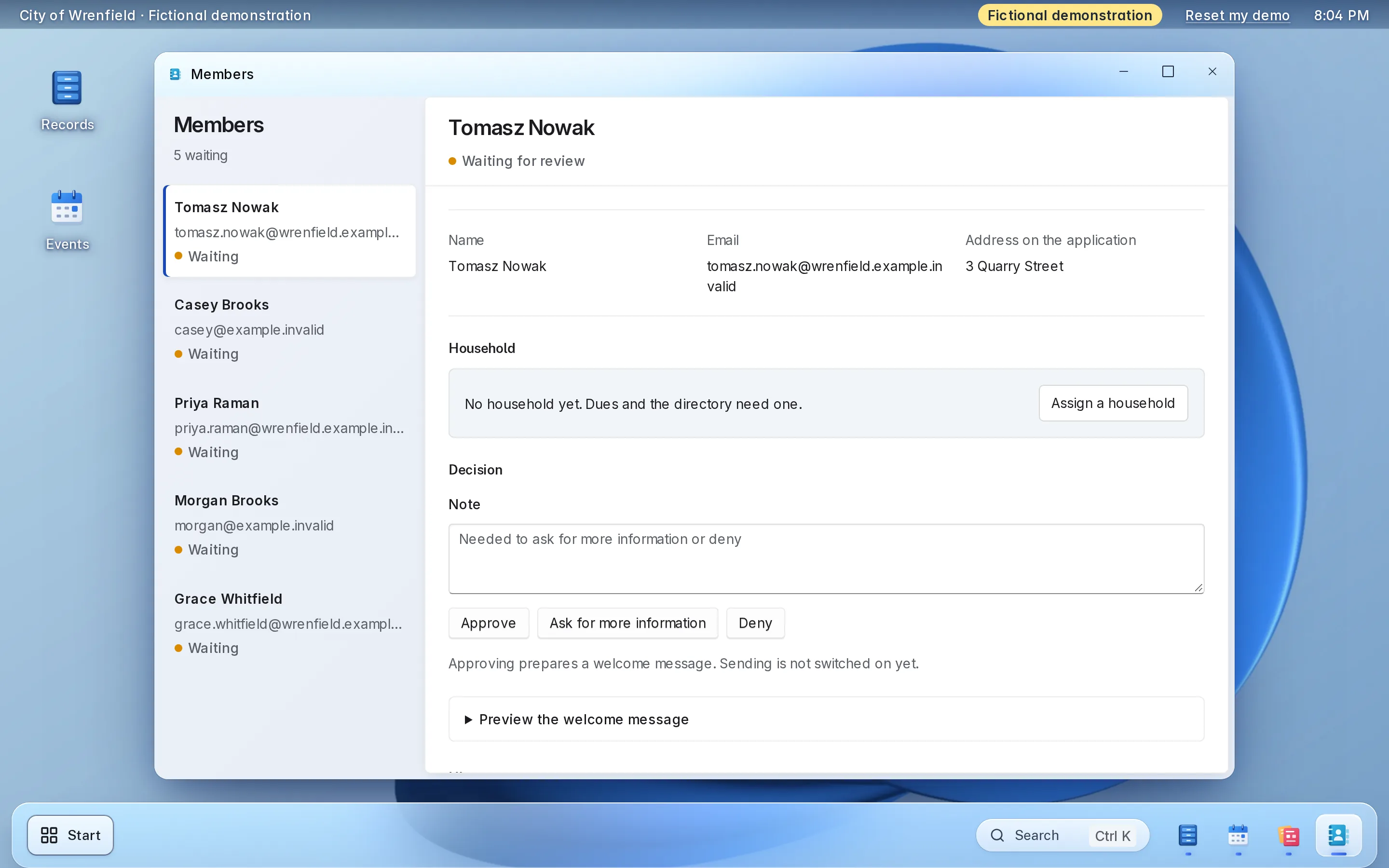
Review applications
Open each one with its documents, then approve or deny it with a note.
-
Review other submissions
Award nominations and certification files wait in one review list.
-
Record checks
Checks and bank transfers go on the same roll as card payments.
-
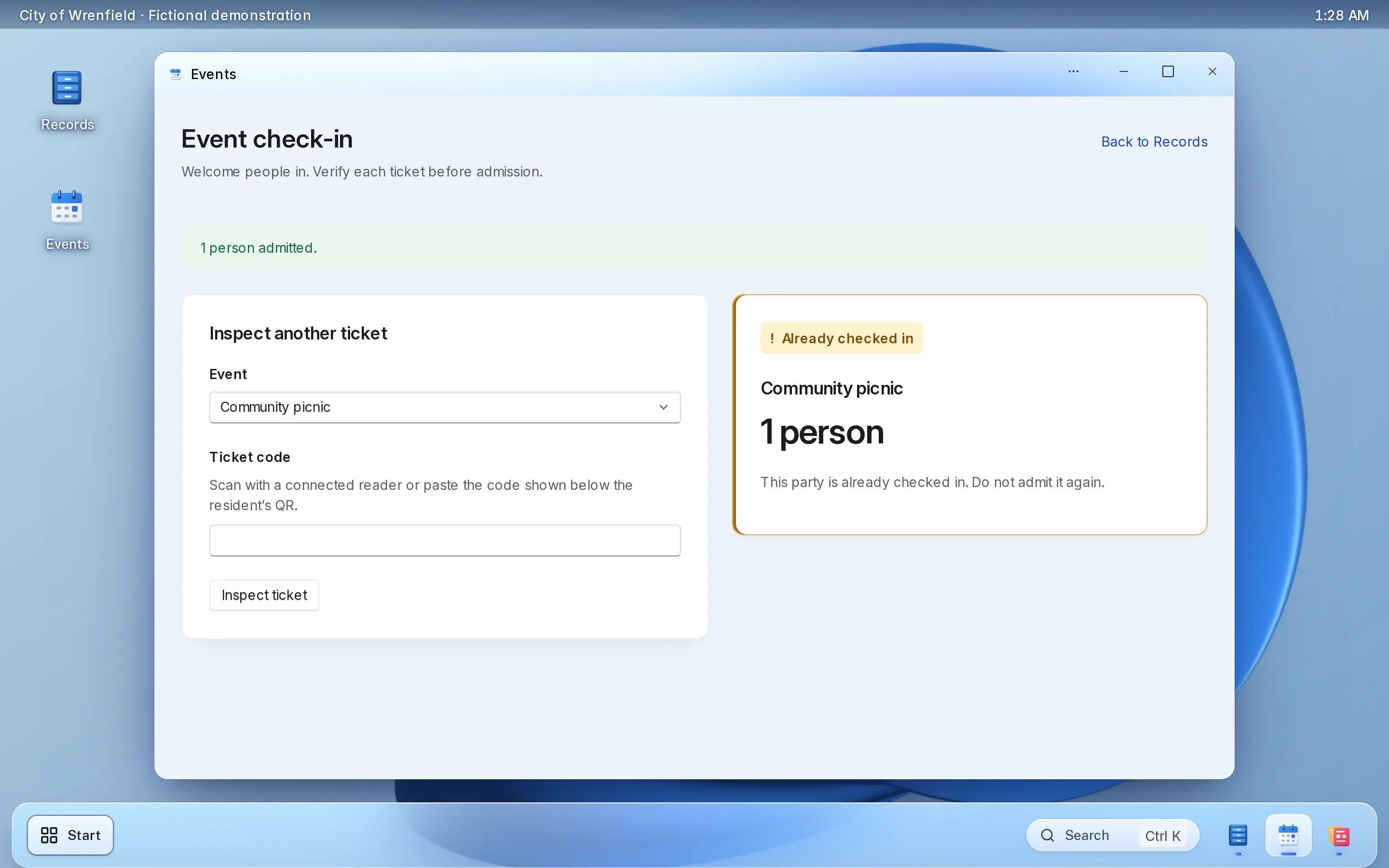
Run the conference door
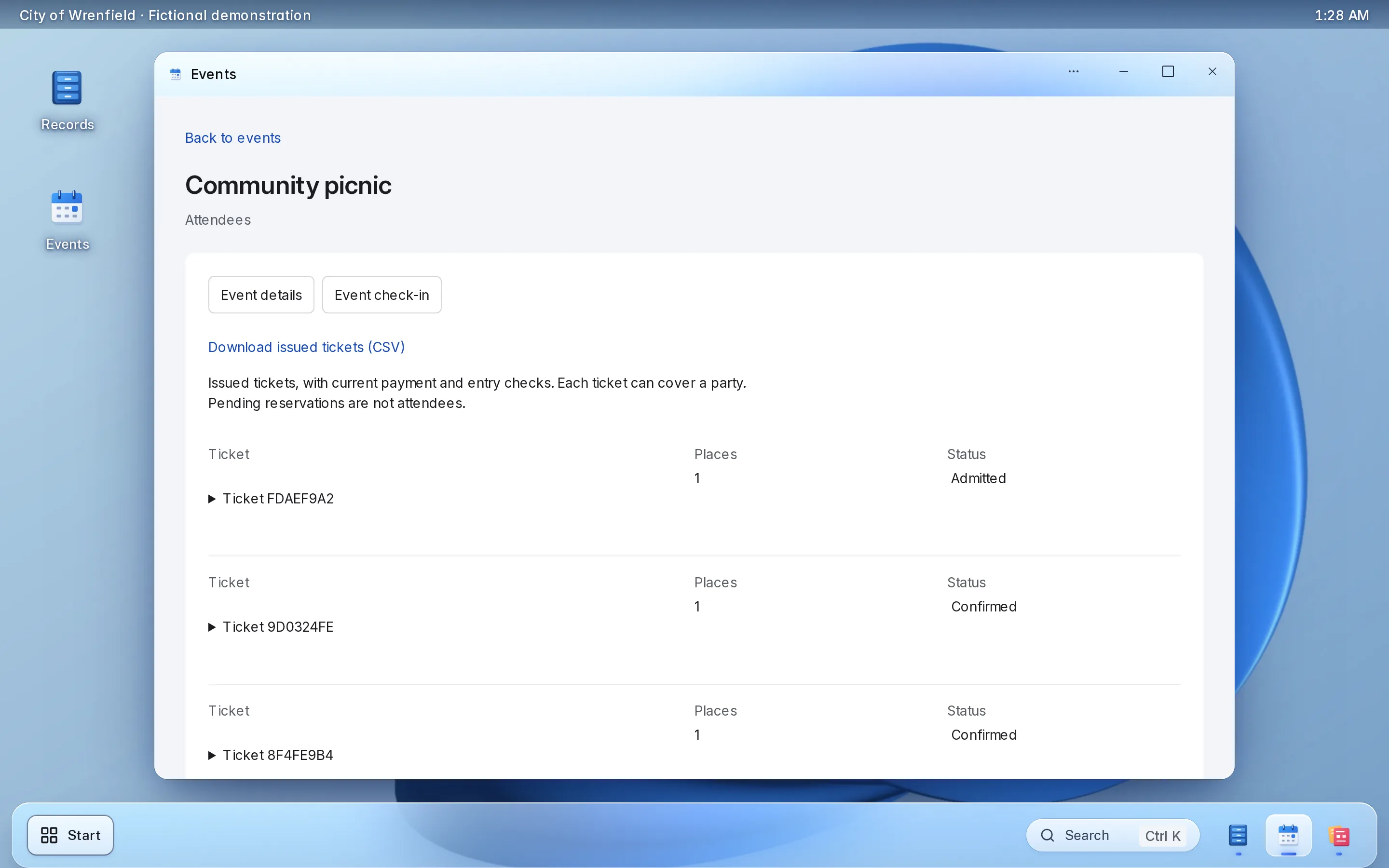
Scan tickets with a phone or laptop camera, then download the attendee list.
What it looks like.
Real screens from LFW’s fictional demonstration organization.
Enlarge to view the full screenshot.
Enlarge to view the full screenshot.
Enlarge to view the full screenshot.
Enlarge to view the full screenshot.
Try the staff screens here.
A working copy of the staff screens, with fictional data. Nothing you do here is sent or saved.
Things to try
-
Approve an application, or deny one with a note
-
Record a dues check for a member who has not paid
-
Change what a member shares in the directory
-
Check a conference ticket in, then try it again
Membership applications
5 waiting
No applications waiting.
Adaeze Okoro, PE
Waiting for review
- Credential attached
- Professional engineer license, PDF
- a.okoro@example.invalid
- Firm address
- Okoro Structural, 18 Foundry Lane
- Applied
- November 2
Kept with the decision. A denial needs one.
Decided
Nothing decided yet.
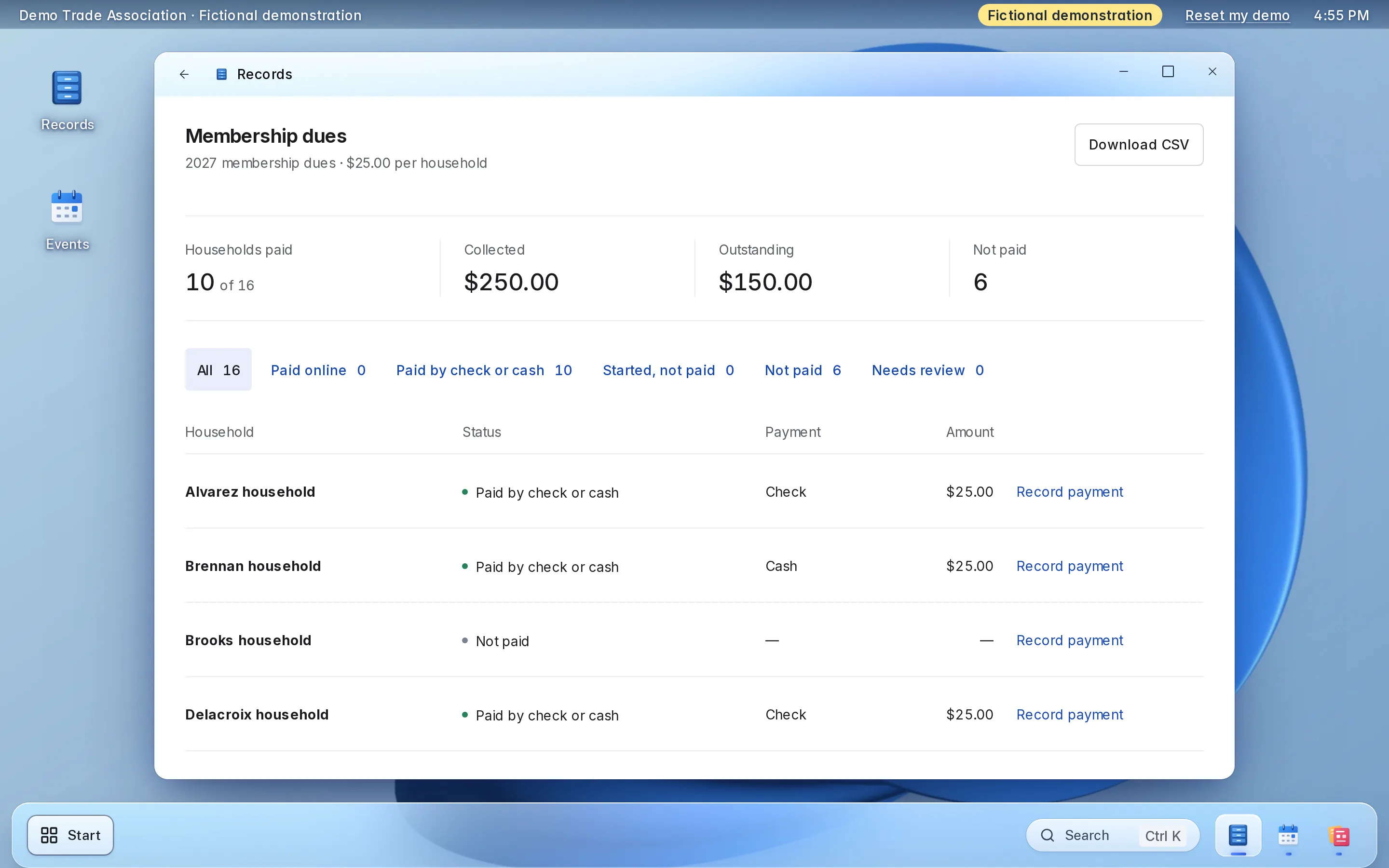
Membership dues
2027 membership dues · $225.00 per person
- Members paid
- 8 of 12
- Collected
- $1,800.00
- Outstanding
- $900.00
- Not paid
- 4
| Member | Status | Payment | Amount | Action |
|---|---|---|---|---|
| Joseph Abara | Paid by check or cash | Check | $225.00 | |
| Hannah Brandt | Paid online | Card | $225.00 | |
| Darius Cole | Not paid | — | — | |
| Inês Duarte | Paid online | Card | $225.00 | |
| Paul Everett | Paid by check or cash | Bank transfer | $225.00 | |
| Ken Fujimoto | Not paid | — | — | |
| Rosa Garza | Paid online | Card | $225.00 | |
| Simone Hale | Paid by check or cash | Check | $225.00 | |
| Sana Iqbal | Not paid | — | — | |
| Lars Jensen | Paid online | Card | $225.00 | |
| Amrit Kaur | Paid by check or cash | Check | $225.00 | |
| Brian Lowe | Not paid | — | — |
Member directory
Only signed-in members can open the directory.
How other members see you
Rosa Garza
- Firm address
- Garza Surveying, 6 Quarry Road
- Phone
- (555) 010-0137
- rosa.garza@example.invalid
Only your member’s name.
- Joseph Abara Abara Electric, 51 Mill Street
- Hannah Brandt h.brandt@example.invalid
- Inês Duarte Duarte Architects, 3 Bridge Street · (555) 010-0151
- Simone Hale (555) 010-0166
- Amrit Kaur Kaur Engineering, 70 River Road · amrit@example.invalid
Nobody matches.
2027 annual conference
Thursday, April 22, 2027 · 8 a.m.–5 p.m. · Riverside Conference Center
- Places booked
- 7 of 300
- Checked in
- 1
- Members
- $295.00
- Nonmembers
- $395.00
Attendees
| Ticket | Holder | Places | Price | Checked in |
|---|---|---|---|---|
| DTA-1047 | Hannah Brandt | 1 | Members | 7:52 a.m. |
| DTA-2290 | Inês Duarte | 1 | Members | Not yet |
| DTA-3315 | Noah Fischer | 1 | Nonmembers | Not yet |
| DTA-4478 | Kaur Engineering | 3 | Members | Not yet |
| DTA-5561 | Lars Jensen | 1 | Members | Not yet |
Fictional demonstration data. Nothing you type is sent or saved, and Reset starts it again.
Each part, in detail.
What it does, and the choices your association makes during setup.
-
Applications and credentials
Your application asks what your membership rules require, and applicants attach their license or certificate. Each one waits in one list until staff decide.
- Applicants can add documents while they wait
- Approve or deny with a note that stays on the record
- A duplicate check flags a second application from the same address
-
Other submissions with files
Award nominations, certification files and other forms with attachments go to a review list your staff work through.
- Staff build the forms
- Files stay with the submission
- Each decision keeps who made it, when and why
-
Dues
Set this year’s dues, per member or per firm. Card payments and the checks staff record land on one roll.
- Card payments go to the association’s own Stripe account
- Checks and bank transfers recorded next to them
- Paid, unpaid and the totals, downloadable as a spreadsheet
-
Conference and events
Staff publish the conference, workshops and receptions with a member price and a nonmember price.
- A waitlist when an event fills
- Tickets scanned at registration with a phone or laptop camera
- The attendee list downloads as a spreadsheet
- Staff cancel and refund a booking, and the places go back on sale
Set it up the way your association runs.
Choices made once, during setup.
Demo Trade Association · Fictional demonstration data. Choices stay in this browser and are not saved. Choose a setup example to preview. Several choices can be used together.
Membership dues
- Each member pays
- $225.00
Membership dues
- Each firm pays once
- $225.00
Document upload
Document upload
2027 annual conference
- Members
- $295.00
2027 annual conference
- Nonmembers
- $395.00
Access
Access
What setup includes.
Most of it is your member list, your dues amount and your application.
What you bring
- Your member list, as a spreadsheet
- This year’s dues amount, and whether members or firms pay
- The questions and documents your application requires
- A Stripe account in the association’s name
- Your conference dates and prices
What LFW does
- Sets up your association’s workspace
- Imports your members from the spreadsheet
- Builds the application and your other review forms with you
- Opens this year’s dues
- Adds the dues button and your events to your website
- Walks your staff through applications, dues and registration
Keep your website.
Members use LFW from the site they already know.
-
A Pay dues button
One script tag adds it to any page of your site.
<script src="https://demo.lfw.com/embed.js" data-key="demo-trade-associations"></script> -
Your events
Upcoming events appear on your site with one script tag.
-
WordPress or Drupal
A plugin or module connects a site that runs on either.
Platform agnostic
-
Only your addresses
The embeds work only on the web addresses you list.
Allowed addressesyourassociation.example
No website yet? Members use the pages LFW hosts for your association, and a website can be quoted separately.
What it costs.
-
Small trade associations
RecommendedStarting at $600 a year
One association running applications, dues and conference tickets.
Get a quoteIncludes
- Membership applications with documents, and review
- Other review forms with file uploads
- This year’s dues, online and recorded by staff
- The members-only directory
- Conference and event tickets
- Setup and the import of your member list
-
Larger organizations
Quoted in writing
For several departments and enterprise implementations.
Get a quoteIncludes
- Everything in the starting plan
- A written quote with the price, what it covers and the term
Stripe charges its own card-processing fees on each payment. They are separate from LFW’s price. LFW adds no fee of its own on each payment.
Your members’ information.
Who sees it, where the money goes and how you leave.
-
The money
Dues and tickets are paid into your association’s own Stripe account, in its name.
-
The directory
Only signed-in members can open it, and each member chooses what it shows.
-
Board and staff access
Each person signs in as themselves and sees only the parts you give them.
-
Hosting
LFW hosts and runs the software. There is nothing for you to install or update.
-
Your data
The dues roll and attendee lists download as spreadsheets whenever you want them.
-
Support
Email LFW with any question. We answer Monday to Friday, 9 a.m. to 5 p.m. Eastern.
Questions.
What does it cost?
Starting at $600 a year for a small trade association. Stripe’s card-processing fees are separate. LFW adds no fee of its own on each payment. Larger organizations, several departments and enterprise implementations cost more and are quoted in writing.
How long does setup take?
Setup is your member list, your dues amount and your application. Your written quote gives the start date.
Can applicants attach a license or certificate?
Yes. The application takes file uploads, and an applicant can add documents while the application waits for review.
Can a firm pay for its people?
Yes. Set dues per firm, and one payment covers the firm’s account. Or set dues per member, and each person pays.
Can nonmembers register for the conference?
Yes. Set a member price and a nonmember price for the same event.
Can members still pay by check?
Yes. Staff record checks and bank transfers on the same roll as card payments.
Where does the money go, and what are the fees?
Into the association’s own Stripe account, in its name. Stripe charges its card-processing fees on each payment, separately from LFW’s price.
Can we bring our current member list?
Yes. Send it as a spreadsheet, and LFW imports your members before you open dues.
Who sees members’ contact details?
Only signed-in members, and only what each member chooses to share. Staff see the parts you give them.
Do we have to change our website?
No. A Pay dues button and your events go on the site you have, with one script tag each. WordPress and Drupal sites can install a connector instead.
Can we get our data out?
Yes. The dues roll and the attendee lists download as spreadsheets at any time. LFW can also export your records as one signed package.
How do we cancel?
Your written quote sets out the term and the notice. Download your dues roll and attendee lists, and ask LFW for the export of your records.
See it with your own members in mind.
Try the live demo, or ask for a written quote your board can review.