For recreation registrars and superintendents
Registration for your recreation department.
Families register and pay online, and your staff work every class and camp from one roster.
- One household account for every child
- Places never oversell, and a full class keeps a waitlist
- Waivers and proof of residency, reviewed by staff
- Residents book and pay for spaces online
For the person who runs registration.
Written for the registrar, the program supervisor and the superintendent who signs off.
- Parks and recreation departments
- Recreation districts
- Program supervisors
- Registrars
-
Today: Registration opens, the phone rings and the front desk retypes paper forms.
With LFW: Families register and pay online, every child from one household account.
-
Today: A class fills in an hour, and nobody can say who was next.
With LFW: Places never oversell, and a full class keeps its waitlist in order.
-
Today: Parents type the same household details for every child and season.
With LFW: The household account keeps the details for the next child and season.
-
Today: Pavilion and field requests come by phone, and the calendar is checked by hand.
With LFW: Residents book spaces online, and staff approve each request.
How a registration season goes.
What a family does, and what your staff do.
A family
-
Opens one household account
Adds each child once. Next season the household is already there.
-
Registers each child
Picks a program for each child and signs its waiver with a typed name.
-
Sends the documents
Uploads proof of residency or any other document you require.
-
Pays, or joins the waitlist
Pays by card to hold the place. A full program keeps a waitlist in order.
-
Books a pavilion or field
Picks an open time, signs the rental agreement by name and pays online.
Registrar and staff
-
Set up the season
Each program gets its own capacity and its own registration dates.
-
Watch registration fill
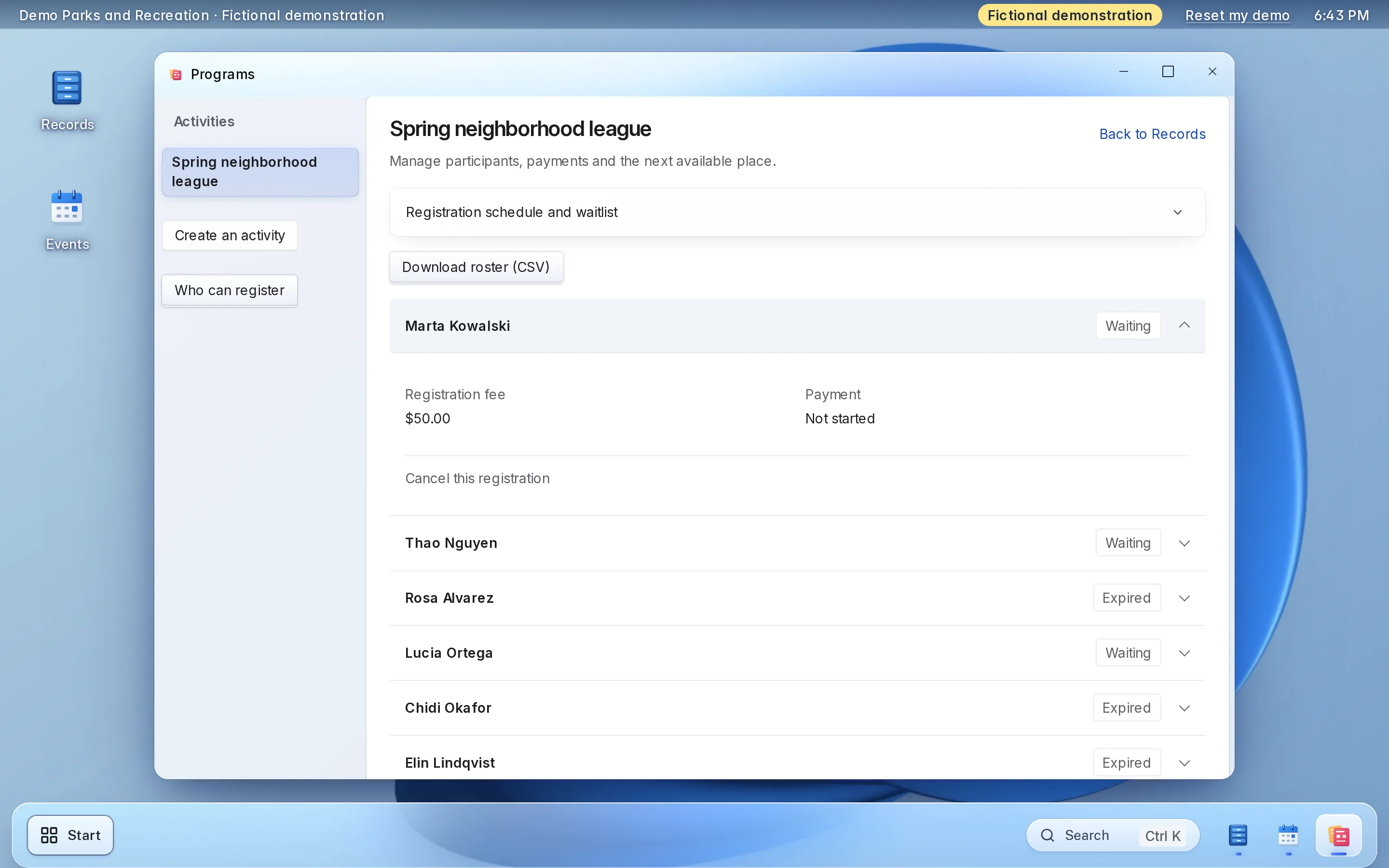
See every registration and the waitlist. Download a roster as a spreadsheet.
-
Review documents and waivers
Approve a document or ask for another copy. Open each signed waiver as a PDF.
-
Approve and refund bookings
Approve space requests, refund in full or in part, or return a deposit.
-
Check people in
The front desk checks a person in and sees why if entry is refused.
Camps and youth leagues have their own pages.
Each is written for the people who run it.


Try registration here.
A working copy of two staff screens, with fictional data. Nothing you do here is sent or saved.
Things to try
-
Register one child from a household account, then watch the places fill
-
Register another child after the class is full and see the waitlist
-
Download the roster, or approve a proof of residency
Saturday Swim Lessons, Level 2
Saturdays, 9 a.m. · Demo Aquatic Center · $48.00 per child
- Places taken
- 5 of 6
- On the waitlist
- 0
| Child | Household | Status |
|---|---|---|
| Maren | Lindqvist household | On roster |
| Per | Lindqvist household | On roster |
| Lucia | Castillo household | On roster |
| Quinn | Brennan household | On roster |
| Sage | Brennan household | On roster |
Proof of residency to review
4 waiting
No documents waiting.
Okafor household
Waiting for review
- For
- A water bill with the household’s street address.
- Household
- Ada and Tobi, Saturday Swim Lessons
- File
- Water bill, October
- Uploaded
- November 8
Kept with the decision. A denial needs one.
Decided
Nothing decided yet.
Fictional demonstration data. Nothing you type is sent or saved, and Reset starts it again.
Each part, in detail.
What it does, and the choices your department makes during setup.
-
Households and registration
One parent registers several children from one household account, and each child can be in a different program.
- Households can be imported from a spreadsheet, so returning families do not start over
- A registration window opens and closes each program on the dates you set
- Staff see each registration with its payment
-
Capacity and the waitlist
A program has a number of places. Places never oversell, even when many families register at once.
- Set the number of places for each program when you create it
- A full program keeps a waitlist in order, first come, first served
- The roster shows who is on it and who is waiting
-
Waivers and documents
Families sign each program’s waiver and send the documents you require, and staff review them.
- The waiver is signed with a typed name, and staff open the signed copy as a PDF
- Ask for proof of residency or another document with the registration
- Staff approve a document or ask the family for another copy
-
Payment
Families pay by card at registration, into your own Stripe account.
- The money goes straight to your Stripe account, in the department’s name
- Staff see the registration and the payment together
- Stripe charges its own processing fees, separate from LFW’s price
-
Rosters
Every program has a roster that staff can read on screen and download.
- Download a program’s roster as a spreadsheet
- Give each person only the programs they need to see
- Import an existing roster or household list from a spreadsheet
-
Spaces, booking and the front desk
Keep your fields, rooms and shelters in one list. Residents book an open time online, sign the rental agreement and pay.
- Residents see open times, the price and the agreement on your community site
- The agreement is signed with a typed name, and staff keep the signed copy
- Set a resident and a non-resident price, a deposit and a cancellation policy for each space
- Staff approve requests, see each space by day and week, and check people in at the desk
-
Space payments and refunds
Residents pay for a booking online, into your own Stripe account, and staff handle refunds from the booking.
- A held time is released if the resident does not pay in time
- Staff refund an online booking in full or in part, with a reason, and return a deposit
- A resident who cancels gets what your cancellation policy allows
- Desk payments are recorded at the desk and refunded the way they were taken
Set it up the way your department runs.
Choices made once, during setup.
Demo Parks and Recreation · Fictional demonstration data. Choices stay in this browser and are not saved. Choose a setup example to preview. Several choices can be used together.
Registration window
When a program opens
Waiver agreement
Document upload
Document upload
Saturday Swim Lessons, Level 2
Saturday Swim Lessons, Level 2
- Roster
- At capacity
- Waitlist
- First come, first served
Fee schedule
Fee schedule
Fee schedule
Fee schedule
Access
Access
What setup includes.
Most of it is your fee schedule and your forms.
What you bring
- Your programs, dates, places and fees for the next season
- The waiver wording for each kind of program, and the rental agreement for each space
- Your space prices, deposits and cancellation policy
- Which documents you ask for, such as proof of residency
- A spreadsheet of your households and current rosters, if you have one
- A Stripe account in the department’s or town’s name
- Who on staff sees which programs
What LFW does
- Sets up your workspace
- Sets up your programs, capacities, registration windows and fees with you
- Sets up each space with its agreement, prices and cancellation policy
- Imports your households and rosters from your spreadsheet
- Connects your Stripe account
- Adds registration to your current website
- Sets staff access, and walks your staff through it before anyone registers
Keep your website.
Families register from the site they already know.
-
One script tag
Add forms to any page of your site with one script tag.
<script src="https://demo.lfw.com/embed.js" data-key="demo-recreation"></script> -
WordPress or Drupal
A plugin or module connects a site that runs on either.
Platform agnostic
-
Your spaces on your site
Show your spaces and open times on a page of your site with one script tag. Booking opens on your community site.
-
Only your addresses
The embeds work only on the web addresses you list.
Allowed addressesyourparks.example
No website to add it to? A link to a page hosted by LFW works on its own.
What it costs.
-
Small recreation departments
RecommendedStarting at $3,000 a year
One department running programs, registration and space booking.
Get a quoteIncludes
- The registration software, hosted and run by LFW
- Programs, households, waitlists, waivers and rosters
- Space booking, rental agreements and payments
- Your staff accounts and their access
- Import of your households from a spreadsheet
- Setup, and a walkthrough for your staff
- Support by email
-
Larger organizations
Quoted in writing
For several departments and enterprise implementations.
Get a quoteIncludes
- Everything in the starting plan
- A written quote with the price, what it covers and the term
Stripe charges its own card-processing fees on each payment. They are separate from LFW’s price. LFW adds no fee of its own on each payment.
Your families’ information.
Who sees it, where the money goes and how you leave.
-
The money
Payments go into your own Stripe account, in your name.
-
Staff access
Each person signs in as themselves and sees only the departments you give them.
-
Waivers and documents
A signed waiver is kept with the registration, and staff review the documents you ask for.
-
Hosting
LFW hosts and runs the software. There is nothing for you to install or update.
-
Your data
Rosters download as spreadsheets whenever you want them, and your records export in a signed package.
-
Support
Email LFW with any question. We answer Monday to Friday, 9 a.m. to 5 p.m. Eastern.
Questions.
What does it cost?
Starting at $3,000 a year, for a small organization. Stripe’s card-processing fees are separate. LFW adds no fee of its own on each payment. Larger organizations, several departments and enterprise implementations cost more and are quoted in writing.
How long does setup take?
Setup is your programs and fees, your waivers, your households and your Stripe account. Your written quote gives the start date and the schedule, and your staff try it with practice entries before families see it.
What happens to our website?
Nothing has to change. Registration can be a link to a page LFW hosts, one script tag on a page of your site, or a plugin for WordPress or a module for Drupal.
Can we bring our households and rosters from the system we use now?
Yes, from a spreadsheet. Export your households and current rosters from your present system and LFW imports them during setup. Anything that cannot be exported as a spreadsheet is delivery work that your written quote scopes.
How do payments and fees work?
Families pay by card at registration, and residents pay for space bookings online, all into your own Stripe account. Stripe charges its own processing fees on each payment. Your written quote says whether LFW charges anything on a payment.
How do refunds and cancellations work?
For a space, staff refund an online booking in full or in part and return a deposit, and a resident who cancels gets what the space’s cancellation policy allows. For a class or camp, staff cancel a registration when a family asks, and the refund goes back through your own Stripe account under your own policy. Families do not cancel a class registration online. Your written quote sets out the details.
Can we charge residents and non-residents different fees?
Yes. Set a resident price and a non-resident price for a space, and a resident fee and a non-resident fee for a class, and staff confirm who is a resident. The software does not check addresses itself, so a person your staff have not confirmed as a resident pays the non-resident price.
Can residents book a pavilion or field online?
Yes, from your community site. A resident picks an open time, types their name to sign the rental agreement and pays online. Staff approve a request first where you ask for that, and can refund or cancel from the booking.
What happens when a class is full?
Places never oversell. A full program keeps a waitlist in order, and staff see it next to the roster.
How is it secured, and who sees what?
Staff sign in as themselves and see only the departments you give them. Payments go to your own Stripe account. LFW hosts and runs the software, and your written quote sets out anything your procurement office needs.
What support do we get?
Email LFW with any question. We answer Monday to Friday, 9 a.m. to 5 p.m. Eastern. Your written quote sets out anything more.
How do we export our data and cancel?
Rosters download as spreadsheets at any time, and your records export in a signed package through LFW. Your written quote sets out the term and the notice.
See it with your own department in mind.
Try the live demo, or ask for a written quote your team can review.