For youth league registrars and presidents
Run the season from one place.
Families register and pay, you place players on teams, and the schedule, scores and standings follow.
- Registration, fees and waivers from one household account
- A coach without a current check cannot be placed
- Schedules that never double-book a field or a team
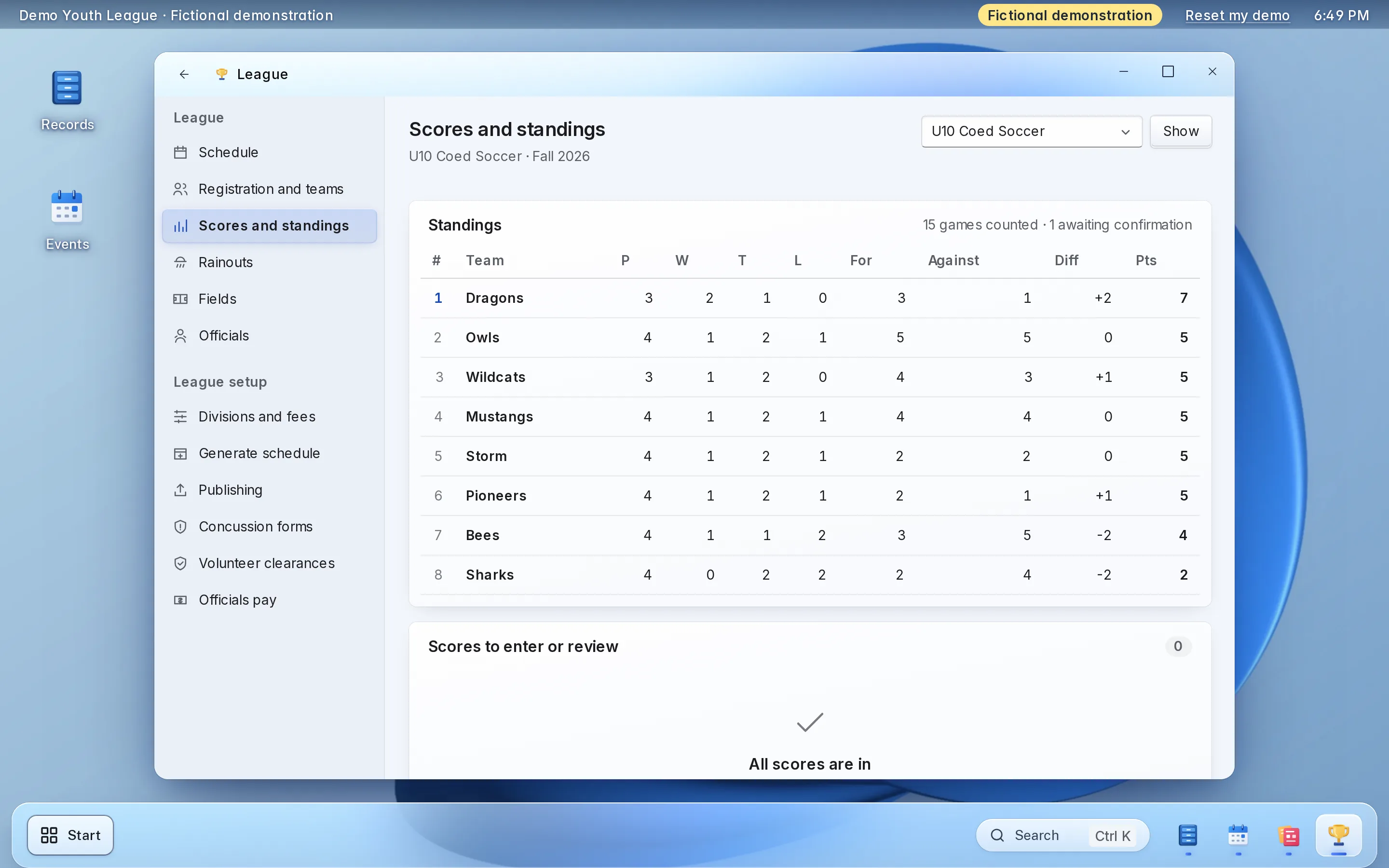
- Scores that count once both coaches agree
For the volunteer who runs the league.
Written for the registrar who also keeps the spreadsheet.
- Volunteer youth leagues
- Registrars and presidents
- League boards
- Clubs with volunteer coaches
-
Today: A division fills, and nobody can say who was next.
With LFW: Registration keeps a waitlist in order when a division fills.
-
Today: Teams are drawn on a spreadsheet that is the only copy.
With LFW: Staff place players on teams on screen, within the roster limit.
-
Today: A coach is assigned, and nobody checked the background check.
With LFW: A coach without a current background check cannot be assigned.
-
Today: A rainout means rewriting the schedule by hand.
With LFW: Postpone a day’s games in one step; new times are checked for clashes.
How a season goes.
What families and coaches do, and what you do.
Families
-
Opens one household account
Adds each child once. Next season the household is already there.
-
Registers each player
Picks the division and signs the waiver. A player outside the age rule is told why.
-
Pays the right fee
The resident or non-resident fee, by card or in two to six payments.
-
Adds health and concussion forms
Allergies, medications and a contact. A guardian signs the concussion form.
-
Joins a team
By a captain’s link or the free-agent pool, then follows the public schedule.
Coaches and volunteers
-
Registers a team
A captain pays the team fee and gets the team’s invite link.
-
Reports the score
It counts once the other coach agrees, or comes to you if disputed.
-
Opens team health details
Their own team only, with a one-line reason that is logged.
-
Signs up for shifts
Volunteers pick and cancel their own shifts. Some roles need a background check.
The registrar and board
-
Set up the divisions
Sport, age group, fees, roster limit and lock date for each division.
-
Place players
See who paid and who has no team, then place them. A full division keeps a waitlist.
-
Check coaches and forms
No current background check, no coaching. No concussion form, no team.
-
Build the schedule
LFW generates a clash-free round robin. You move games, postpone rainouts and publish.
-
Run games to the playoffs
Assign officials, settle scores, read standings and seed the bracket.
Try registration here.
A working copy of one staff screen, with fictional data. Nothing you do here is sent or saved.
Things to try
-
Register a player from a household account, then watch the places fill
-
Register a player after the division is full and see the waitlist
-
Download the registration list as a spreadsheet
U10 Coed Soccer, spring 2027
Saturdays, April to June · Demo Youth League fields · $60.00 per player
- Places taken
- 5 of 6
- On the waitlist
- 0
| Player | Household | Status |
|---|---|---|
| Maren | Lindqvist household | Registered |
| Per | Lindqvist household | Registered |
| Lucia | Castillo household | Registered |
| Quinn | Brennan household | Registered |
| Sage | Brennan household | Registered |
Fictional demonstration data. Nothing you type is sent or saved, and Reset starts it again.
Each part, in detail.
What it does, and the choices you make during setup.
-
Registration and households
One parent registers several children from one household account, and each child goes into a division.
- Returning families are already in the account next season
- Staff see each registration with its payment
- Households can be imported from a spreadsheet, so returning families do not start over
-
Divisions, fees and age
Each division is a season's group, with its own fee and its own limit.
- A division has a sport, a season and an age or skill group
- A resident price and a non-resident price, and a cap on how many non-residents a roster may hold
- An age range counted on a cutoff date you choose, such as August 1
- A division fills to its places and then keeps a waitlist
-
Placing players on teams
Registration comes first, and placement is a separate step you control.
- Staff see who has registered and paid and is not yet on a team, and place them
- Or a captain shares an invite link, and players join the team themselves
- A division can require a completed registration before an invite link works, and a cancelled or refunded one no longer counts
- Players who have not been placed wait in a free-agent pool
- A roster limit and a lock date hold for every way a player can join
-
Checks when someone is placed
The safety rules run at placement, so nobody is placed first and checked later.
- A coach without a current background check cannot be assigned, and you record each result with its date
- A player without this season's concussion acknowledgment cannot be put on a team, when you switch that rule on
- After a suspected concussion, staff record the removal from play and the provider's written clearance, and the player stays off a team until then
- LFW records the clearance and never makes the medical decision, and it performs no background check
-
Health details and the concussion form
Families enter what a coach needs to know, from their own account.
- Allergies, medications, conditions and an emergency contact for each player
- A coach opens only their own team, gives a one-line reason, and the look is logged
- The concussion acknowledgment is your exact wording, versioned, signed by a guardian with a typed name
- Staff can enter a signature from a paper form, and every signature keeps the version it was signed against
-
The schedule
A round-robin schedule that cannot double-book a field or a team.
- Byes when a division has an odd number of teams, field slots and dates when no games are played
- Staff review the schedule, move a game and publish it
- Close a field and the schedule respects it
- Playoff brackets, single or double elimination, seeded from standings
-
Rainouts and new times
Postpone a day's games in one step, then give each game its new time.
- Postpone every game on a date, at chosen fields or everywhere
- The public page and each team's calendar show Postponed at once
- A new time is checked against field bookings, closures and team games before it is set
- Postponed games leave the standings alone
-
Scores and standings
Standings follow the games, and nobody retypes them.
- A coach reports the score from their account, and the other coach confirms or disputes it
- Staff settle a dispute, and a score an official or staff enter counts at once
- Standings count confirmed scores only, with the points per win and tie that you choose
- Ties are broken by head-to-head points, then score difference
-
Officials
Assign officials, and see who is not covered.
- Nobody is assigned to two overlapping games, and nobody officiates a team they play for or coach, unless staff override it on purpose
- An official sees their own games and can report a score
- A pay report lists each official's games in a period and what is owed at your rates, as a spreadsheet
- LFW pays nobody. The report is for your treasurer
-
Volunteers
Coaches and snack-stand helpers, with the checks you need.
- Post a shift with a role, a time, a place and a number of places
- Residents sign up and cancel their own place, and a full shift closes
- A role that works with children can require a current background check
-
What families see
Public pages that answer the question every parent asks.
- A schedule, scores and standings page for each division, and a games page for each team
- A calendar feed for each team that a family adds to a phone
- Pages show team names, fields, times and scores, never a player, coach or contact
- Nothing is public until you publish a division, and unpublishing takes it down at once
-
Payment
Families pay by card at registration, into your league's own Stripe account.
- The money goes straight to your Stripe account, in the league's name
- Staff see the registration and the payment together
- Stripe charges its own processing fees, separate from LFW's price
Set it up the way your league runs.
Choices made once, during setup.
-
How a division is named and filled
-
Who a division is for
-
What a player pays
-
How players reach a team
-
How many players a team can hold
-
What is checked before someone is placed
-
How a score counts
-
When a game cannot be played
-
Who sees what
What setup includes.
Most of it is your divisions, your fees and your rules.
What you bring
- Your divisions, seasons, age cutoff dates, places and fees, resident and non-resident
- Your waiver wording and your concussion acknowledgment wording
- Your roster limits and lock dates
- Your fields, and the dates they cannot be used
- Your officials' pay rates, if you pay them
- A spreadsheet of your households from last season, if you have one
- A Stripe account in the league's name
- Who on the board and among the coaches sees which parts
What LFW does
- Sets up your workspace
- Sets up each division with its fee, places, age rule, roster limit and lock date
- Connects registration to team placement
- Generates each division's schedule and publishes it when you say
- Sets your concussion wording, your clearance rule and your pay rates
- Imports your households from your spreadsheet
- Connects your Stripe account
- Adds the schedule and standings to your current website
- Sets staff access, and walks your board through it before anyone registers
Most league settings have no screen of their own yet, so LFW enters them with you during setup and again when you ask for a change. Your written quote says how changes during the season are handled.
Keep your website.
Families find the schedule on the site they already know.
-
Standings and games on your site
A division's standings, upcoming games and recent results appear on any page of your site with one script tag. Team names only.
-
WordPress or Drupal
A plugin or module connects a site that runs on either.
-
Only your addresses
The embeds work only on the web addresses you list.
No website to add it to? A public page for each division, hosted by LFW, works on its own.
What it costs.
-
Small leagues
RecommendedStarting at $500 a year
One league running registration, teams, schedules and officials.
Get a quoteIncludes
- The registration and season software, hosted and run by LFW
- Divisions, households, waitlists, waivers, rosters and fees with resident prices
- Team placement, coach checks and the concussion form
- Schedules, rainouts, scores, standings and public pages
- Officials and the pay report
- Your staff accounts and their access
- Import of your households from a spreadsheet
- Setup, and a walkthrough for your board
- Support by email
-
Larger organizations
Quoted in writing
For several departments and enterprise implementations.
Get a quoteIncludes
- Everything in the starting plan
- A written quote with the price, what it covers and the term
Stripe charges its own card-processing fees on each payment. They are separate from LFW’s price. LFW adds no fee of its own on each payment.
Your players’ information.
Who sees it, where the money goes and how you leave.
-
The money
Fees are paid into your own Stripe account, in the league's name.
-
Board and coach access
Each person signs in as themselves and sees only the parts you give them. A coach sees their own team.
-
Health and concussion records
Health details and concussion records are kept apart from the public pages, and only staff you give access to can read them. Each look at a team's health details is logged with a reason.
-
Public pages
Public pages show team names, fields, times and scores. They never show a player, a coach or a contact.
-
Hosting
LFW hosts and runs the software. There is nothing for you to install or update.
-
Your data
Registration lists download as spreadsheets whenever you want them, and your records export in a signed package.
-
Support
Email LFW with any question. We answer Monday to Friday, 9 a.m. to 5 p.m. Eastern.
Questions.
What does it cost?
Starting at $500 a year, for a small organization. Stripe’s card-processing fees are separate. LFW adds no fee of its own on each payment. Larger organizations, several departments and enterprise implementations cost more and are quoted in writing.
How long does setup take?
Setup is your divisions and fees, your waiver and concussion wording, your households and your Stripe account. Your written quote gives the start date and the schedule, and your board tries it with practice entries before families see it.
We already use a league registration service. What would we gain?
The safety rules run at placement. A coach without a current background check cannot be assigned to a team, and, when you switch the rule on, a player without this season's concussion acknowledgment cannot be put on a team. The roster limit, the lock date and the non-resident cap hold the same way for every way a player joins. Ask your present provider whether it blocks the placement or only records the form.
What would we give up?
LFW does not send notices to families, so a rainout you postpone shows on the public page and on each team's calendar but is not sent to anyone. It has no team chat, no scoring app and no app to install, and it does not build a tournament entry page. It does not run background checks or accept a payment other than by card through Stripe. If your league relies on any of those, keep that part where it is.
What happens to our website?
Nothing has to change. A division's standings and games can appear on any page of your site with one script tag, or through a plugin for WordPress or a module for Drupal. Without a site, LFW hosts a public page for each division.
Can we bring last season's households?
Yes, from a spreadsheet. Export your households from your present system and LFW imports them during setup. Anything that cannot be exported as a spreadsheet is delivery work that your written quote scopes.
How do payments and fees work?
Families pay by card at registration, or in two to six payments if you offer a plan, into your own Stripe account. You can set a resident price and a non-resident price. Residency is a yes or no that your staff confirm, and addresses are not verified. Stripe charges its own processing fees on each payment. Your written quote says whether LFW charges anything on a payment.
Can a team register and pay?
Yes. A captain registers the team, pays the team fee and receives the team's invite link, and players then join from it. The team appears under a neutral name until you approve the name the captain asked for.
How do rainouts work?
You postpone every game on a date, at chosen fields or everywhere, and the public page and each team's calendar show Postponed at once. When you give a game a new time, it is checked against field bookings and closures first. LFW holds the notices it would send until sending is switched on, so tell families through your usual channel.
Who sees our players' health details?
Families enter allergies, medications, conditions and an emergency contact from their account. A coach opens only their own team's details, gives a one-line reason, and the look is logged. Concussion records are separate and only staff you give access to can read them. No public page shows a player.
How do we export our data and cancel?
Registration lists download as spreadsheets at any time, and your records export in a signed package through LFW. Your written quote sets out the term and the notice.
See it with your own league in mind.
Try the live demo, or ask for a written quote you can read at your own pace.