Get the everyday work done
Send the staff update, broken link, event page, or existing-form change. Set the priorities in your portal and see each request through to completion.
Ongoing website management
Keep the website moving.
Give your team its time back.
An accountable web team for the site you already have. We handle the everyday work, look after the underlying systems, and help you decide what to improve next.
A monthly fee quoted for your organization.
Free to request. No meeting required.
August 2026
New officers listed with titles and photos. Last year’s board moved to the archive page.
Posted as accessible PDFs and linked from the board page.
Bio, headshot, and contact line added to the team page.
Reproduced on iPhone and Android. The fix is in testing.
An access decision is needed before implementation.
| Site health | This month | Last month |
|---|---|---|
| Accessibility | 100 | 97 |
| Performance, desktop | 96 | 88 |
| Performance, phone | 91 | 79 |
| Broken links | 0 | 4 |
| Pages checked | 15 | 15 |
Automated accessibility scores do not establish conformance.
Try the report: open a request or switch views.
Your ongoing web team
For communications teams, associations, nonprofits, and public-facing organizations with a website to run and other work to do. Most of our work is in WordPress; tell us what you use.
Send the staff update, broken link, event page, or existing-form change. Set the priorities in your portal and see each request through to completion.
Core, theme, and plugin updates, staging review where available, and checks after deployment. We review alerts during business hours, verify the managed host’s backups, and coordinate with providers.
Requests, correspondence, and approvals stay together. Your monthly service record makes completed work, available monitoring trends, and the next decisions easier to explain to your team.
See the working product
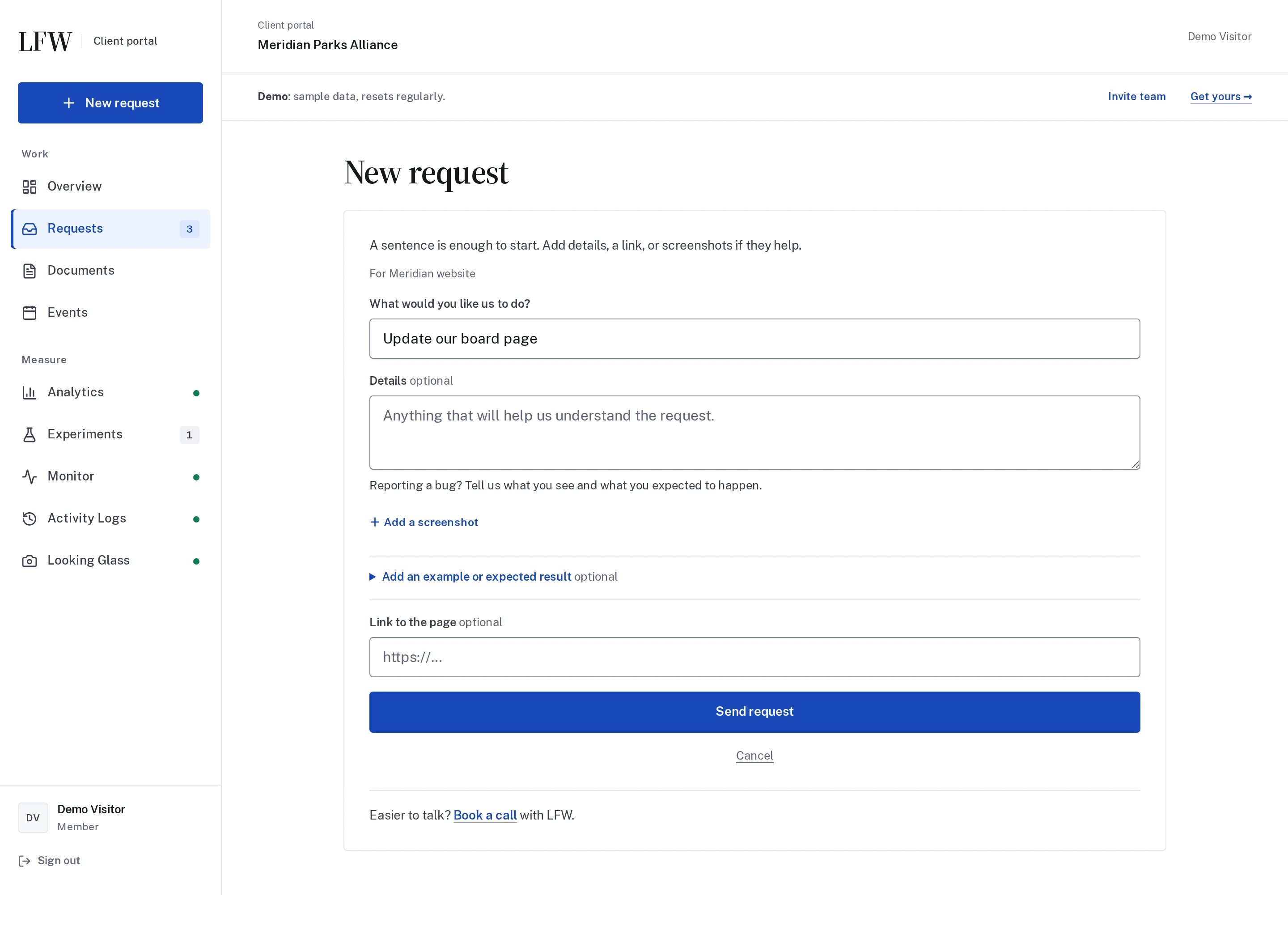
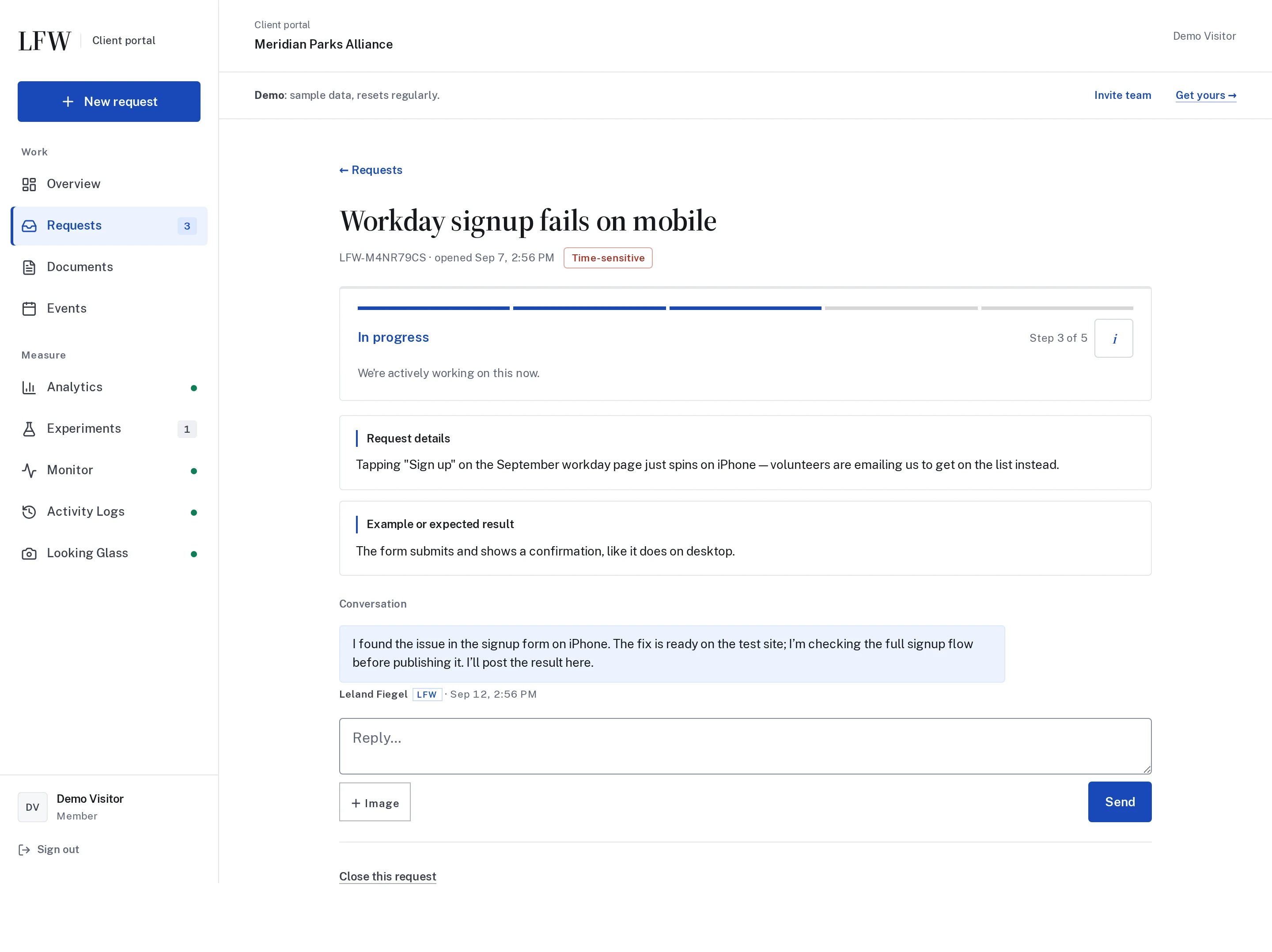
Describe the change, attach the context, and track its progress. Your team can return to the conversation instead of hunting through an inbox.
These are real screens from the LFW Client Portal, populated with fictional demonstration data. Enlarge either view, or explore the demo yourself.
Explore the Client Portal
Enlarge to view the full screenshot.

Enlarge to view the full screenshot.
Continuous Improvement Plan
Our team can proactively review your site and suggest useful changes. Bring the goals, the recurring frustrations, or simply the feeling that the website could be doing more.
Talk through your prioritiesReview key journeys, content, available analytics, and recurring requests. Look for things such as a confusing donation flow, a hard-to-find resource, or a form that asks too much.
We explain the opportunity, likely effort, and dependencies. You decide the priorities, with routine changes and separately quoted projects clearly identified.
Deliver approved work, verify the change, and review the results where measurement is available. Feed what we learn into the next round of improvements.
LFW tools and optional add-ons
The retainer gives you a team to act on what the tools reveal. We agree the monitoring, reporting, and any optional services your site needs in the quote, including setup, recurring charges, and limits.
Catch what changes between requests
Scheduled checks of public pages for accessibility, performance, broken links, and domain configuration. Review the findings and decide what needs attention.
Runs from LFW’s infrastructure. No WordPress plugin or visitor tracking script is required for public-site checks.
Explore MonitorUnderstand the actions behind the numbers
Connect clicks with configured goals, including form completions. Optional Replay follows a consented journey across public pages, with masked playback, form milestones, and click-density heatmaps to investigate possible friction.
LFW configures a first-party relay and site script. Replay is off by default, with consent, public-page coverage, sampling, and retention controls.
Replay follows enabled public pages in the same tab after an explicit opt-in. Form milestones are recorded without typed values. Private pages and content are excluded.
LFW.com replays can show verified public copy and approved images and fonts. Other customer sites currently keep all text masked. Heatmaps are relative click-density grids, not pixel-perfect screenshot overlays.
Replay requires separate recorder setup. Installing LFW Connect alone does not enable it.
Keep a visual record of the website
Capture agreed public pages on a schedule and compare how they change. Return to a dated record when reviewing work or planning what comes next.
Captured remotely by LFW. A public-page archive complements the host’s backups; it does not replace a restorable website backup.
Explore Looking GlassKnow who changed what, and when
Follow WordPress user activity, content edits, and post-metadata changes in a hosted activity record. Give your team context when investigating an unexpected change.
A WordPress connector sends events to LFW’s hosted service. We configure the connection and portal access for your organization; Drupal support is not yet available.
Explore Activity LogsTest a change before making it permanent
Compare two versions of a page against a defined goal, such as a completed quote request or signup. Follow results in the Client Portal, including when there is not enough evidence to choose a winner.
Setup includes Cloudflare routing, approved page variants, and goal tracking, quoted separately before a test goes live.
Explore ExperimentsConnect advertising results with visitor choices
Manage consent choices and conversion tracking for Meta, LinkedIn, and Google Ads. Review tag changes and server-side delivery from the Client Portal, with a clear record of what was published.
LFW Connect links WordPress to your workspace. Each advertising destination needs account access, configuration, and a verified test event before activation.
Explore Tag ManagerScope and costs
Your monthly fee is agreed in writing for your organization. Routine operations, larger projects, and third-party running costs have distinct scopes, so you can decide what to approve.
Monthly retainer
Up to 30 minutes of hands-on work per routine task. Unlimited requests, worked one at a time per site, subject to fair use.
Separate fixed quote
Design, custom development, and larger requests are scoped and priced separately. You approve the written quote before project work starts.
Provider charges
We identify these running costs and who pays them before you approve the feature. They are additional unless your written quote includes them.
Start with a quote
A small, occasionally updated site and a busy multi-site organization need different levels of support. Your quote reflects the sites, publishing activity, features, and response needs involved.
Send what you know. We review the public site and reply with a preliminary range or focused follow-up questions; the final scope and monthly fee are agreed before work starts.
Free, with no obligation. Book a call if you have questions or prefer to talk it through.
You do not need every answer, admin access, or a finished brief to get started.
Standard or Priority
Both tiers include the same routine-work scope. The difference is how quickly we acknowledge a task and begin certain defect work.
| Request | Standard | Priority |
|---|---|---|
| Acknowledge a new task | 1 business day | 4 business hours |
| Begin fixing an LFW-caused defect | Same business day | Same business day |
| Begin remediation of other defects | Next business day | Same business day |
Good-faith response targets, not completion guarantees. Monday through Friday, 9 a.m. to 5 p.m. Eastern, excluding U.S. federal holidays. No standard after-hours or on-call coverage.
Read the service scheduleCapabilities
Make publishing easier, help members find one another, or connect donations to the right systems. Explore the specific work our team can help you plan and deliver.
Routine work through the retainer. Bigger ideas through an approved project. New functionality, design, custom development, and larger work need a separate fixed quote, with any provider charges explained upfront.
Tell us what people need to accomplish. We will investigate the approach, explain the constraints, and quote a practical scope.

Led by Leland Fiegel
Leland’s prior roles involved public-sector websites, large WordPress portfolios, and sites for major WordPress product brands. That experience informs how we plan, maintain, and document your website today.
Meet LelandPrior employment, not LFW client engagements.
After your quote is approved
We start with the website you have, the people who use it, and the work waiting to happen. This is an illustrative onboarding sequence; we agree the schedule and access needs with you.
Week 1
Nominate your requesters and approvers. We review the site, hosting, and backlog together, then agree what comes first.
Week 2
Set up the portal, monitoring, and agreed key-page archive. Check important forms and backup arrangements, and begin the first changes.
Weeks 3–4
Work through the queue in your chosen order. Review improvement ideas and approve any separately quoted projects you want to pursue.
Day 30
See what changed, what remains open, and which decisions need your input. Use that record to agree the next priorities.
Ownership and continuity
Your content, organizational accounts, and paid client-specific deliverables belong to you. We explain the operating costs and handoff needs when choosing how to build a feature.
Read the ownership and handoff termsA form might live in WordPress or connect to a hosted service. A community might need Discourse hosting; payments might use Stripe. We identify accounts, licenses, running costs, and dependencies before you approve the approach.
For hosted LFW tools, we agree the ongoing fees, continuation options, and data handoff before enabling the service. Availability and included features are specific to the tool; your quote identifies which services are part of the engagement.
Returning credentials, account access, and repository access is included at no charge. Exports, migration, successor walkthroughs, or rebuilding a hosted form in a tool such as Gravity Forms are separately scoped projects, quoted for approval.
A free place to start
Run the free audit for an automated first pass, then bring the results to your quote request or call. It can surface issues worth discussing; it is not a full assessment or a requirement for a quote.
Before you start
Still have questions? Book a call and talk through the fit, the scope, or what your team needs next.
Book a callYour monthly fee is quoted for your organization. The number of sites, publishing pace, complexity of the systems, and response target all affect the scope. Once agreed, the fee is fixed in writing before work starts; we do not bill by the hour.
Request a quote for a preliminary monthly range or the focused questions needed to establish one. The request is free, with no obligation.
No meeting is required. Send a quote request and we can review your public website and follow up by email. If you prefer to talk through the situation, book a call.
Either route leads to a written scope and quote for approval before an engagement begins.
Start with your website address and a short description of what you need. Useful context includes:
You do not need a technical specification or private account access for the initial range. If something is unclear, we ask focused follow-up questions.
Bring the site and what feels difficult, even if that is simply a lack of time. Our team can review the site and suggest practical priorities through a Continuous Improvement Plan.
You decide which recommendations to act on. Agreed routine changes go into your request queue; larger work receives a separate fixed quote for approval.
Some features depend on services with their own charges. We explain those costs as part of the proposed approach, including:
Your agreement identifies what is included, what you pay a provider directly, and anything LFW resells. Larger builds and custom development also receive a separate fixed quote before work begins.
The retainer runs month to month. Either side can end it with thirty days’ written notice. The published Services Agreement and your signed Order Form set the terms.
Your content, data, and organizational accounts remain yours. Deliverables created specifically for you belong to you once paid, subject to the software licenses in the agreement. LFW retains its general tools and frameworks; using a hosted service does not transfer ownership of that service.
We return your credentials, account access, and repository access at no charge and reasonably cooperate with an orderly handoff for thirty days after termination.
Work such as data exports, migration assistance, or walkthroughs for your next provider is separately scoped and quoted for your approval. Transition work requires all undisputed amounts to be paid, as described in the Services Agreement.
Hosted tools need an ongoing service to operate. Availability, included features, fees, and any option to continue separately are agreed for the particular tool before it is enabled. A product preview does not mean the tool is included in every retainer.
We discuss the practical exit path when choosing the tool. Continuing the hosted service needs an agreement; replacing it, such as rebuilding a hosted form in Gravity Forms, may require a separately quoted project and a plugin license.
On a managed host you approve and LFW confirms can support the work. Kinsta and Pressable are examples, not the only choices. We approve the specific plan and setup, not just the company name.
For WordPress, we generally look for:
Fast means a current PHP runtime, full-page caching and CDN support, enough resources for expected traffic, and no host-level bottleneck in staging or production measurements.
The hosting account stays in your name and you pay the host directly. We run the site; the host runs the servers and the uptime.
Monitor and Looking Glass check public pages remotely from LFW’s infrastructure, so they do not require a WordPress plugin. Your website can remain on a suitable host such as Pressable or Kinsta; we confirm access and the host’s configuration during setup.
Analytics and optional Replay use a first-party relay and a site script. Activity Logs uses a WordPress connector. We explain the installation, permissions, and any additional costs before enabling a tool.
A routine task takes up to thirty minutes of hands-on work. Requests are unlimited and worked one at a time per site, subject to fair use. Larger work, requests spanning systems, design, and custom development receive a fixed written quote and start only with your approval.
Standard targets acknowledgment of a new task within one business day. Priority targets acknowledgment within four business hours. These are response targets, not completion promises or guarantees.
Business hours are Monday through Friday, 9 a.m. to 5 p.m. U.S. Eastern Time, excluding U.S. federal holidays. Delivery depends on the work and queue position.
The retainer covers business hours and does not include after-hours support or on-call coverage. Your managed host is responsible for infrastructure, uptime, and its backup service. Any requirement beyond the published scope needs a separate agreement before you rely on it.
Your team can keep publishing through existing templates and agreed permissions. We can help clarify roles and the review process. A new publishing workflow or custom integration needs its own scope and quote.
You can run the free automated website check for a first look at public email settings and HTTPS, with optional homepage speed and accessibility checks. It is a useful starting point, not a security assessment or accessibility certification.
A commissioned full audit adds expert review of an agreed scope and is quoted separately. Neither is required to request a retainer quote.
Request a free, no-obligation quote to move forward. We will review the site, clarify what you need, and agree the scope and monthly fee before work starts. You can also book a call with questions.