LFW Public Works Suite

Every pothole report goes to a crew with a date on it.

Residents report problems on your own website.

  • Potholes, streetlights and missed pickups
  • Routed to the right department with a target date
  • Residents see where their report stands

For public works departments in towns, cities and countiesBuilt, in the LFW account · working demo with fictional data

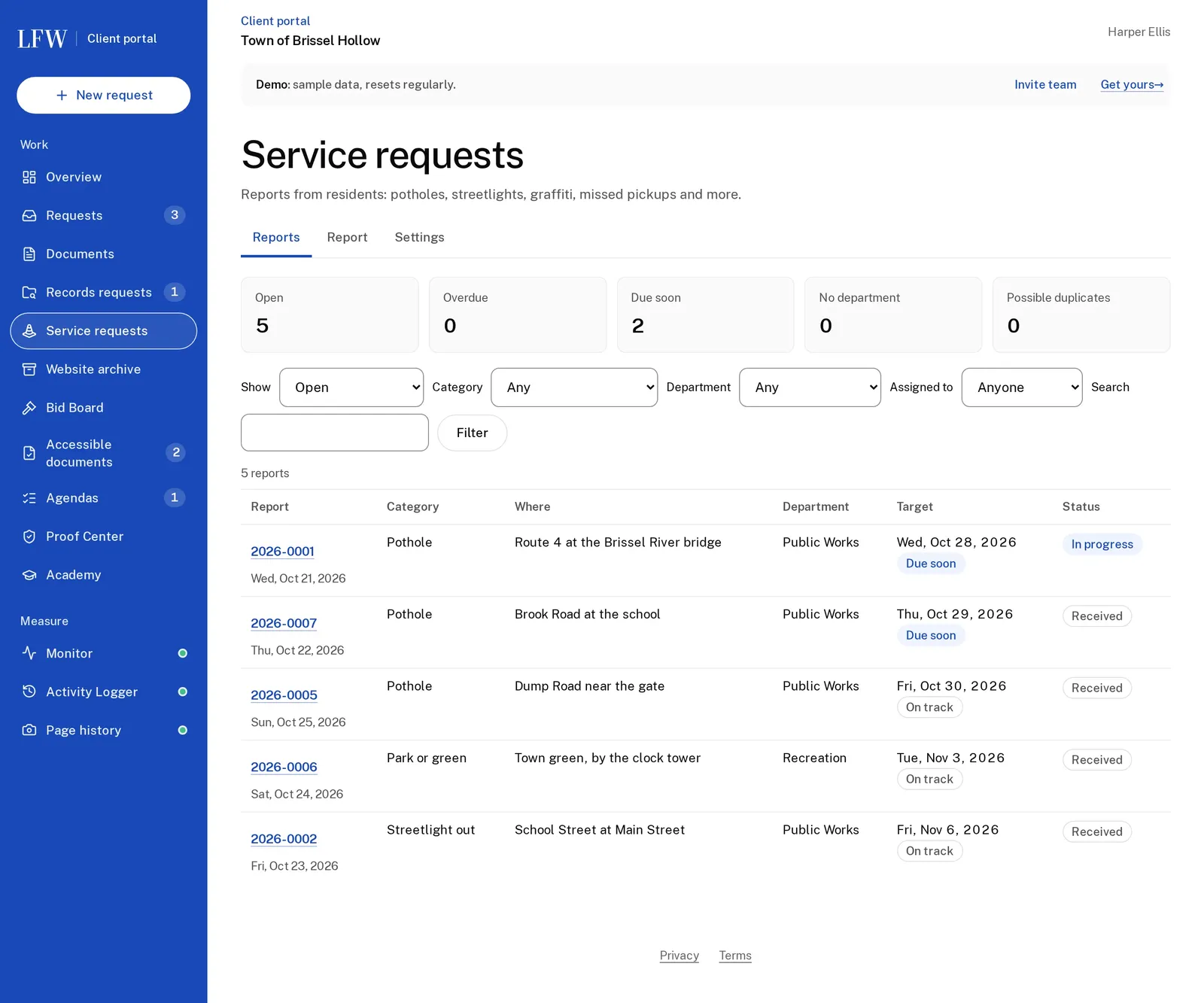
LFW Service Requests for the fictional town, marked Demo: counts of open, overdue, due soon, unassigned and possible duplicates, and a list of five resident reports such as potholes and a streetlight out, with location, department, target date and status.
Fictional department, labeled Demo data.

One report, start to finish.

From the resident's phone to the crew and back, in the working demo for a fictional town.

  1. 8:12 a.m. A resident reports a pothole by the bridge from a phone, on the town's own website. One report
  2. 8:13 a.m. It lands in Public Works with a target date. A second report of the same hole is flagged as a likely duplicate. One report
  3. Afternoon The supervisor assigns it and adds a staff-only note. The resident sees In progress. One report
  4. Friday The crew resolves it before the target date. One report
  5. Month end The report shows how many were resolved within target, by category and department. Report

LFW Service Requests, from report to resolved.

One product today. The form sits on your website through a free plugin; the queue above is in the LFW account.

Each report with the resident's own words

Where it is, what the resident wrote and who has it.

  • Routed to a department by category, with a target date; likely duplicates flagged.
  • The location with a map pin and the resident's description.
  • Status, assignment and staff-only notes that the public never sees.
  • No IP address stored, and resident text never shown publicly without a person's review.

Replaces Phone notes passed from desk to desk

One service report, a pothole on Route 4 at the Brissel River bridge: In progress and Due soon, its category, target, department, map pin and the resident's own words, with forms to change status, assign and add a staff note.

How the department is doing

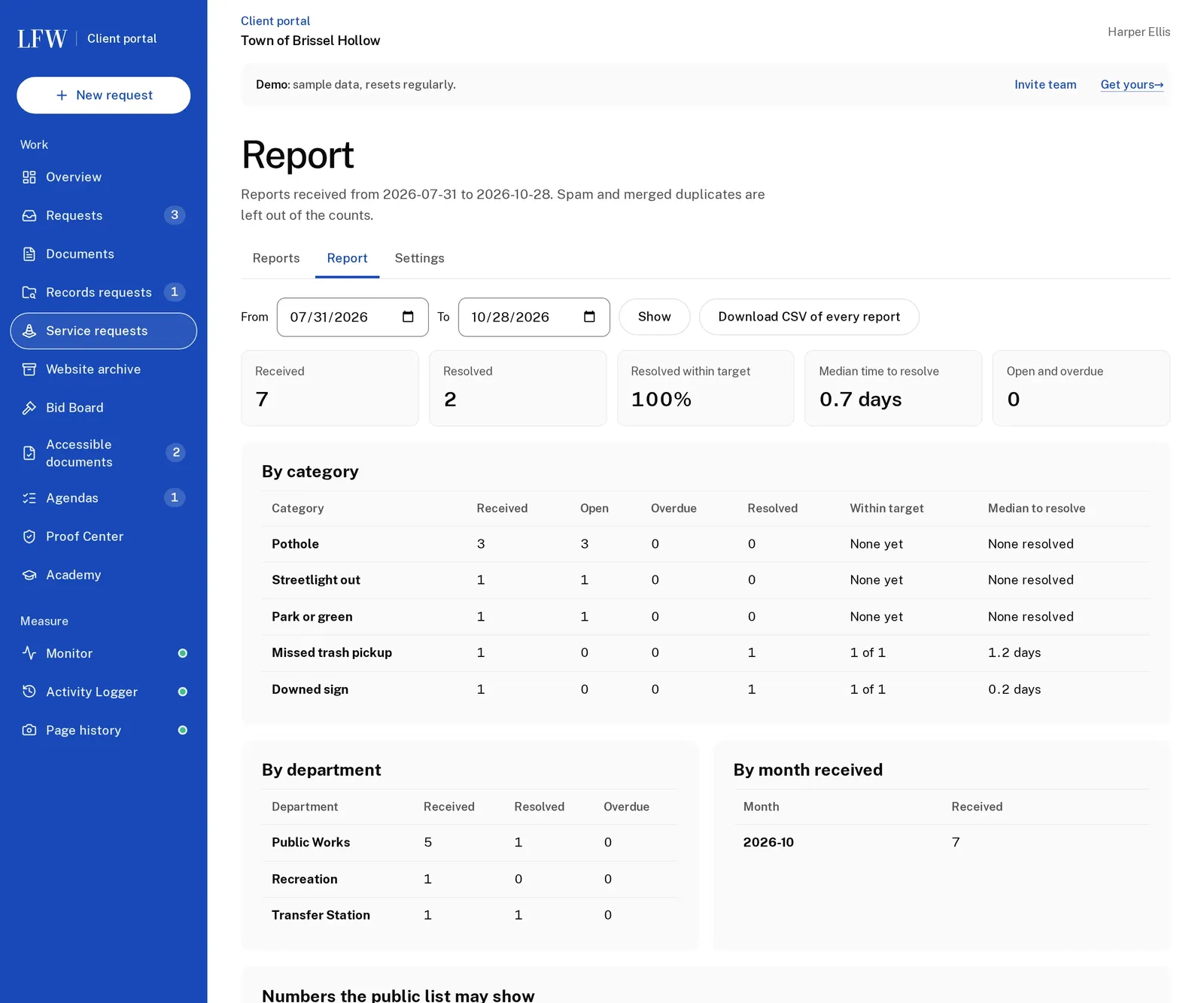
Received, resolved and resolved within target.

  • Counts by category, department and month.
  • The share resolved within target, and the median time to resolve.

Replaces A monthly count made by hand

The service requests report: seven received, two resolved, 100% resolved within target, median time to resolve, and tables by category, department and month.

On the same account as the rest of the town.

Service requests share the LFW account with records requests, agendas and the website, so staff sign in once.

Your own website
The report form is on your site through a free plugin, in your design.
One account
Staff sign in to the same LFW account they use for records requests and agendas.
Abuse closed first
Rate limits per visitor, size caps and no stored IP addresses.
One activity record
Every status change and assignment, with who and when.

The LFW platform: your website, forms, sign-in and monitoring. See the platform

What towns pay today.

Resident reporting apps are sold by yearly subscription.

BuyerWhat they boughtPrice
A Michigan city, 2025Resident service request app$39,119 a year
A Michigan city, 2019The same product$40,250 over three years

Contracts in LFW's bid records, from public council documents. Ask LFW for a quote.

What the demo shows.

7
reports in the demo town's month, with potholes and a streetlight
100%
of resolved reports closed within target, from the product's own report
0
IP addresses stored; a daily-rotating hash counts distinct visitors
1
queue for every department, with duplicates flagged

Working demo with fictional data for the Town of Brissel Hollow. Work orders, crew scheduling and a map view are not built.

Questions public works departments ask.

Is there a map?

Each report has a map pin and an OpenStreetMap link. A map of all open reports is not built yet.

Does it create work orders?

Not yet. It tracks the report to resolution; work orders and crew scheduling are not built.

Can residents report without an account?

Yes. The form asks only what the department needs, and it is limited per visitor to stop floods of fake reports.

Do residents see each other's reports?

No. A resident's words are never shown publicly without a person's review.

Follow one pothole with us.

We show your staff a report from the resident's phone to resolved, in the working demo.