LFW Emergency Management Suite

Every incident on ICS, from one record.

Incidents and exercises on ICS, from the first hour to the after-action report.

  • Hospitals report their own beds
  • Coordinators approve volunteers
  • An audit log that cannot be rewritten

For health departments, healthcare coalitions and emergency managersWorking demo with fictional data · not in production

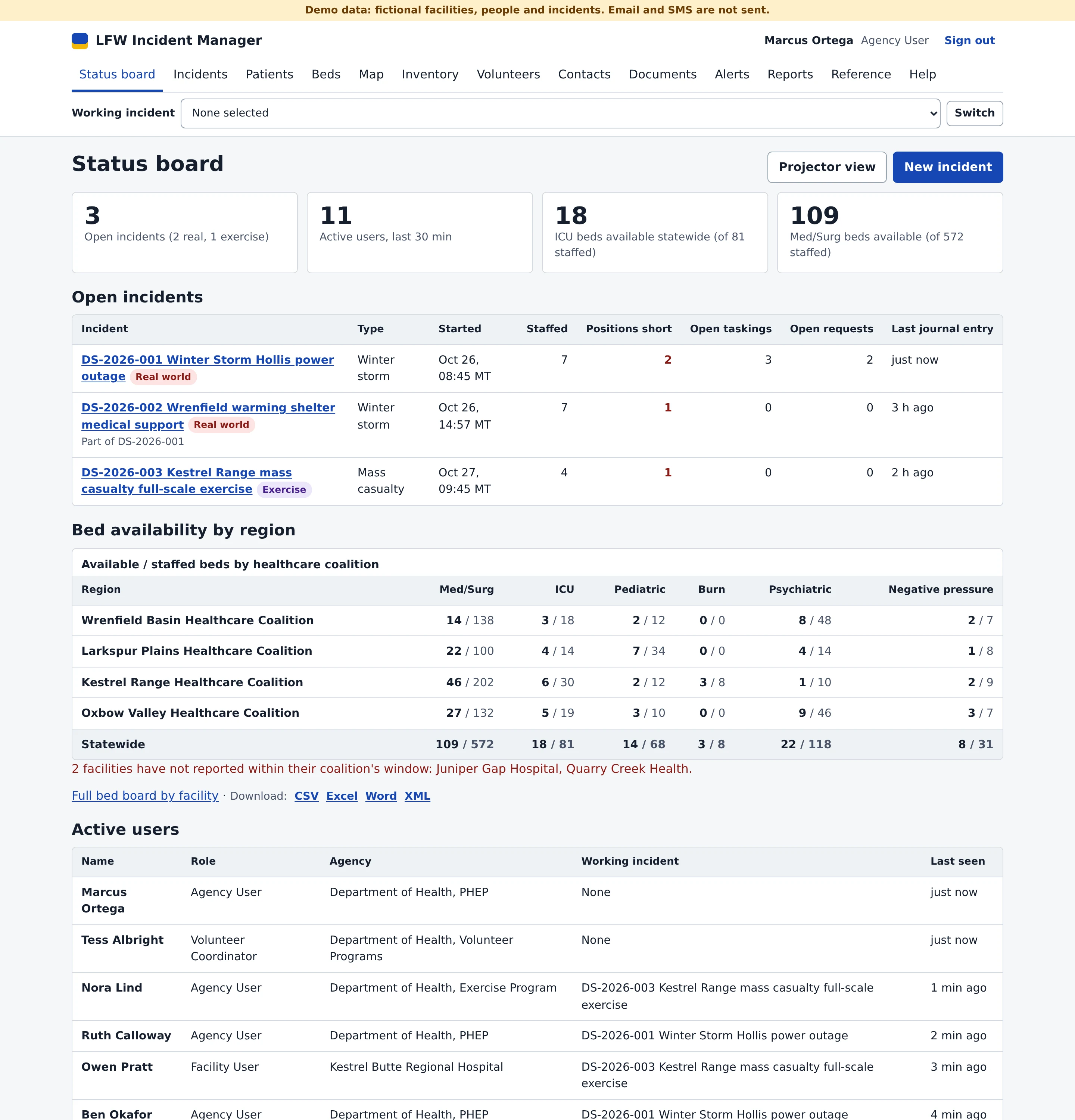
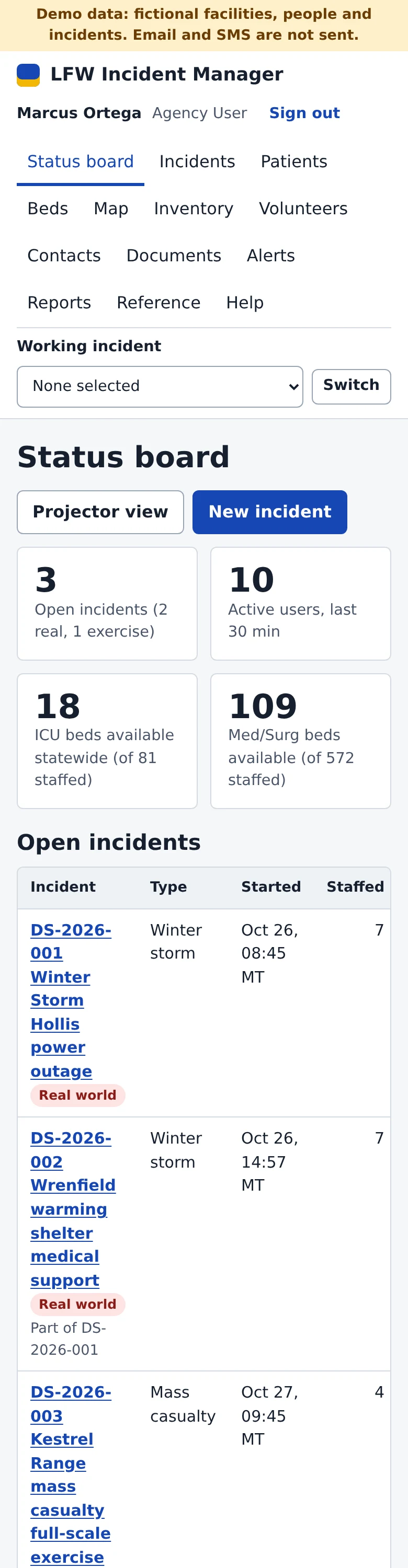
The Incident Manager status board for a fictional state health department: counts of open incidents, active users and statewide ICU and Med/Surg beds available, then each open incident with its staffing and positions short, bed availability by healthcare coalition and the users active now.
Fictional department, labeled Demo data.

A year in a preparedness program.

Real incidents and exercises run side by side in the same system, each clearly marked.

  1. January An ice storm. Hospitals update their own beds from a phone, and a facility that misses its reporting window is flagged. Beds and patients
  2. April A full-scale exercise on ICS, with every position staffed and every action plan issued as a numbered copy. Incident action plans
  3. June A volunteer drive. Applications, licenses and expiry dates go into one queue for the coordinator. Volunteers
  4. August The exercise's after-action report rates each core capability and turns the gaps into an improvement plan. After-action reports
  5. Any night A position drops below its minimum, and the incident's staff get an alert. Incidents

LFW Incident Manager, from the first hour to the after-action report.

One product today, built on ICS and HSEEP. Incidents, beds, patients, supplies and volunteers share one record.

Incidents on ICS

Positions, taskings and a journal for every operational period.

  • ICS positions with a minimum and maximum, and an alert when one runs short.
  • Emergency Support Functions 1 to 15 on positions, taskings and resource requests.
  • A journal with photos from a phone camera. An entry cannot be edited; a correction is a new entry.
  • All-hazards and HICS position checklists, checked off with a name and time.

Replaces Incident management systems sold by quote, and the shared spreadsheet

Read more about LFW Incident Manager
A fictional winter storm incident in Incident Manager: its operational period, operations center level, situation and objectives, with buttons for the incident action plan, ICS 201, 202, 203, 204, 205A, 213 and 214, the after-action report and Send alert.

Incident action plans

A plan per operational period, printed together and kept as issued.

  • A cover page with ICS 202, 203, 204, 205A and the 201 situation summary.
  • Issuing a plan keeps a numbered copy exactly as printed.
  • ICS 201 and 213 in Word for the people who still want paper.

Replaces Forms filled in by hand and emailed as attachments

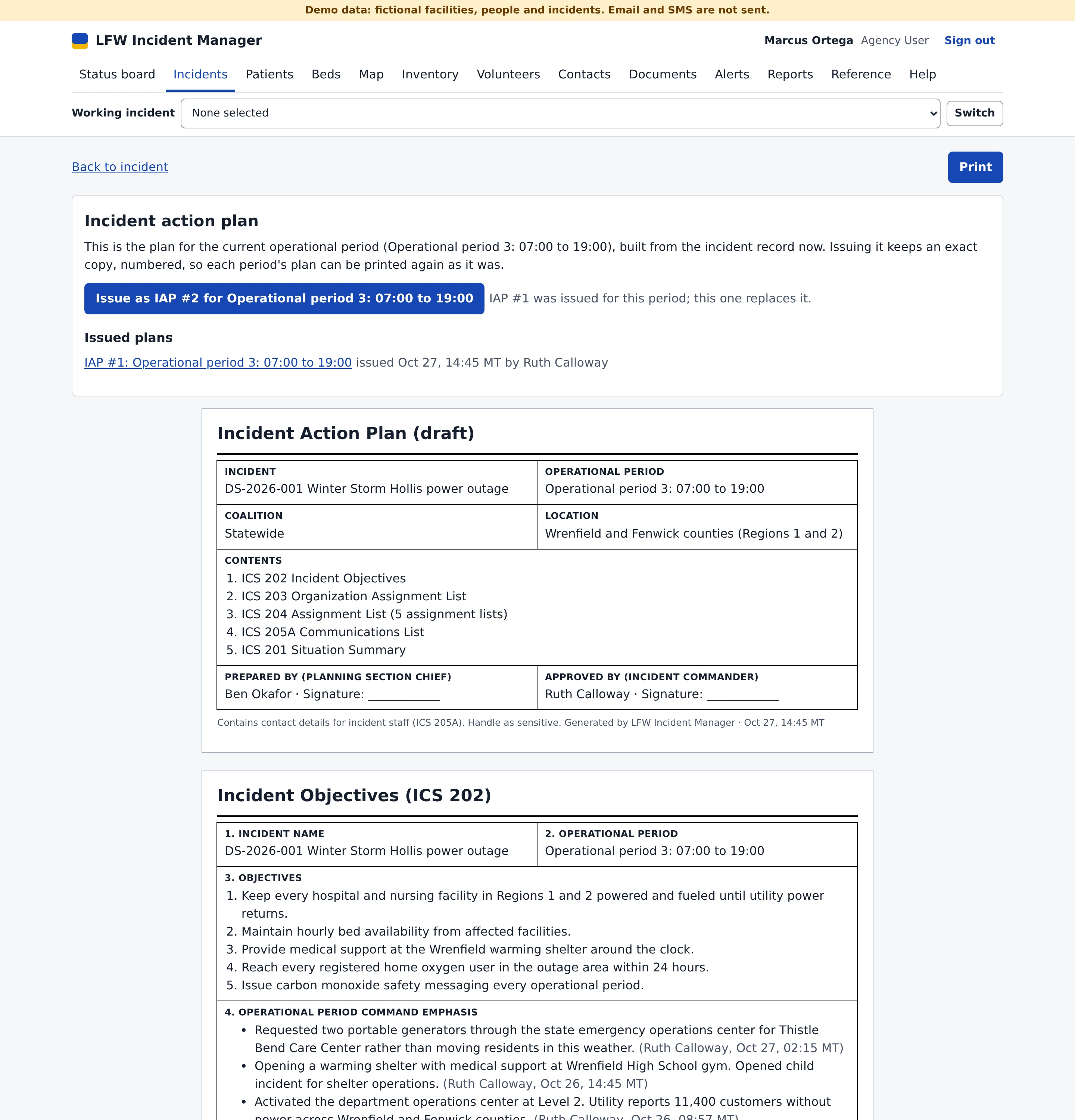
The incident action plan for one operational period: a button to issue it as a numbered plan, the plans already issued, then the cover page listing ICS 202, 203, 204, 205A and the ICS 201 situation summary, and the ICS 202 objectives.

Beds, patients and supplies

Hospitals report once, and the coalition and the state see the same numbers.

  • Six bed categories with coalition and statewide totals.
  • An API for hospital systems, with GeoJSON for ArcGIS and QGIS.
  • START triage, QR triage tags and a patient movement history that cannot be changed.
  • Stock at state, coalition and facility caches, with low-stock alerts.

Replaces Bed polling by phone and a separate patient tracking tool

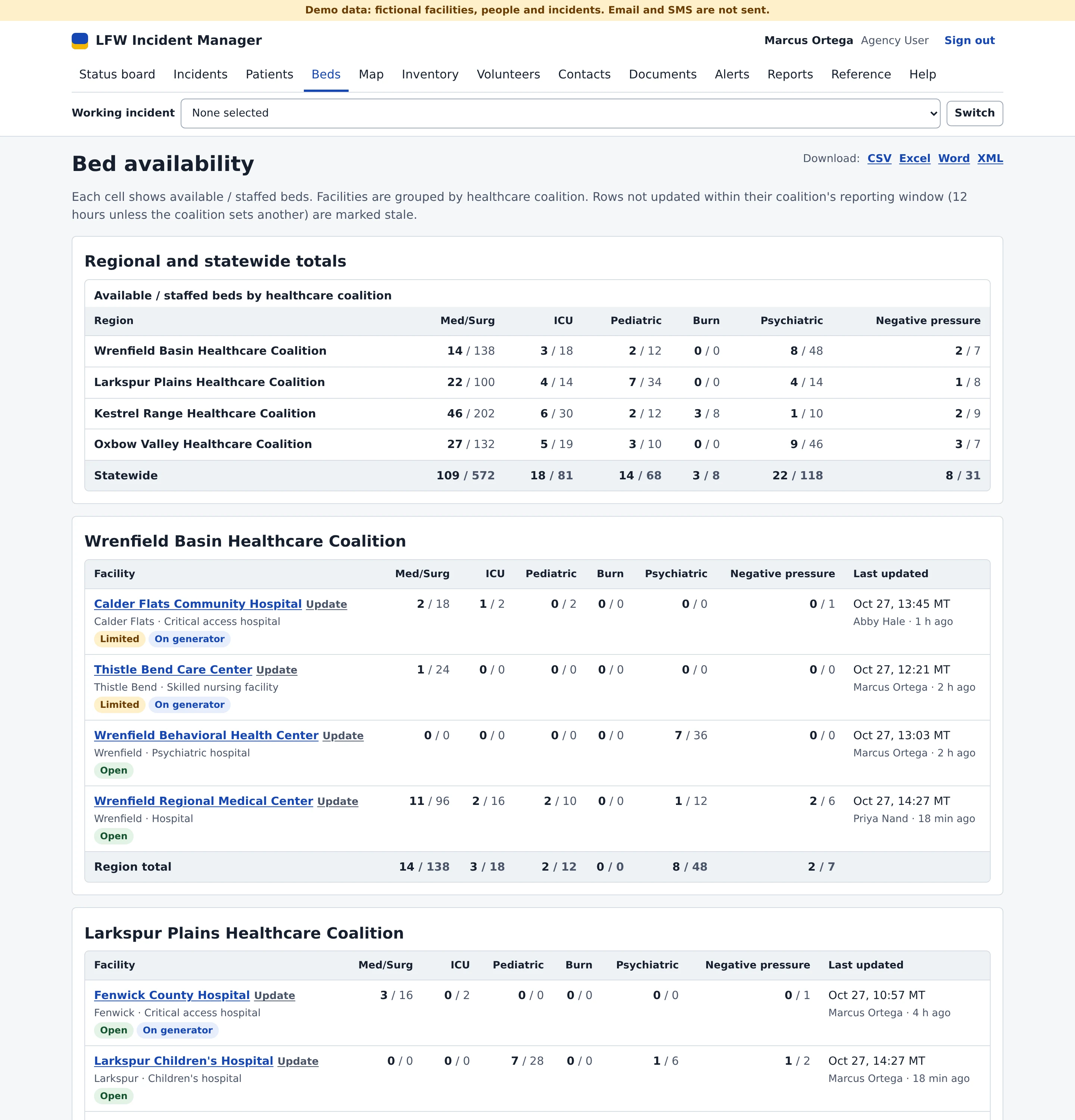
The bed board: available and staffed beds in six categories (Med/Surg, ICU, Pediatric, Burn, Psychiatric and Negative pressure) by healthcare coalition and statewide, then each fictional facility with its status, such as Limited or On generator, and who last updated it.

Volunteers

From public sign-up to check-in at the incident.

  • Applications from a public page, approved or rejected in a queue.
  • A volunteer with an expired credential cannot be assigned.
  • QR badges that check volunteers in and out of an incident.

Replaces Registry exports and paper sign-in sheets

The volunteer coordinator's page: applications waiting for review with Approve and Reject buttons, credentials expired or expiring within 60 days, and approved volunteers with their license and where each is deployed.

After-action reports on HSEEP

The AAR/IP written from the incident record, not from memory.

  • Core capabilities rated P, S, M or U, with an improvement plan.
  • The Joint Commission Six Critical Elements evaluation included.
  • Print, or download in Word and XML.

Replaces A report assembled by hand weeks after the exercise

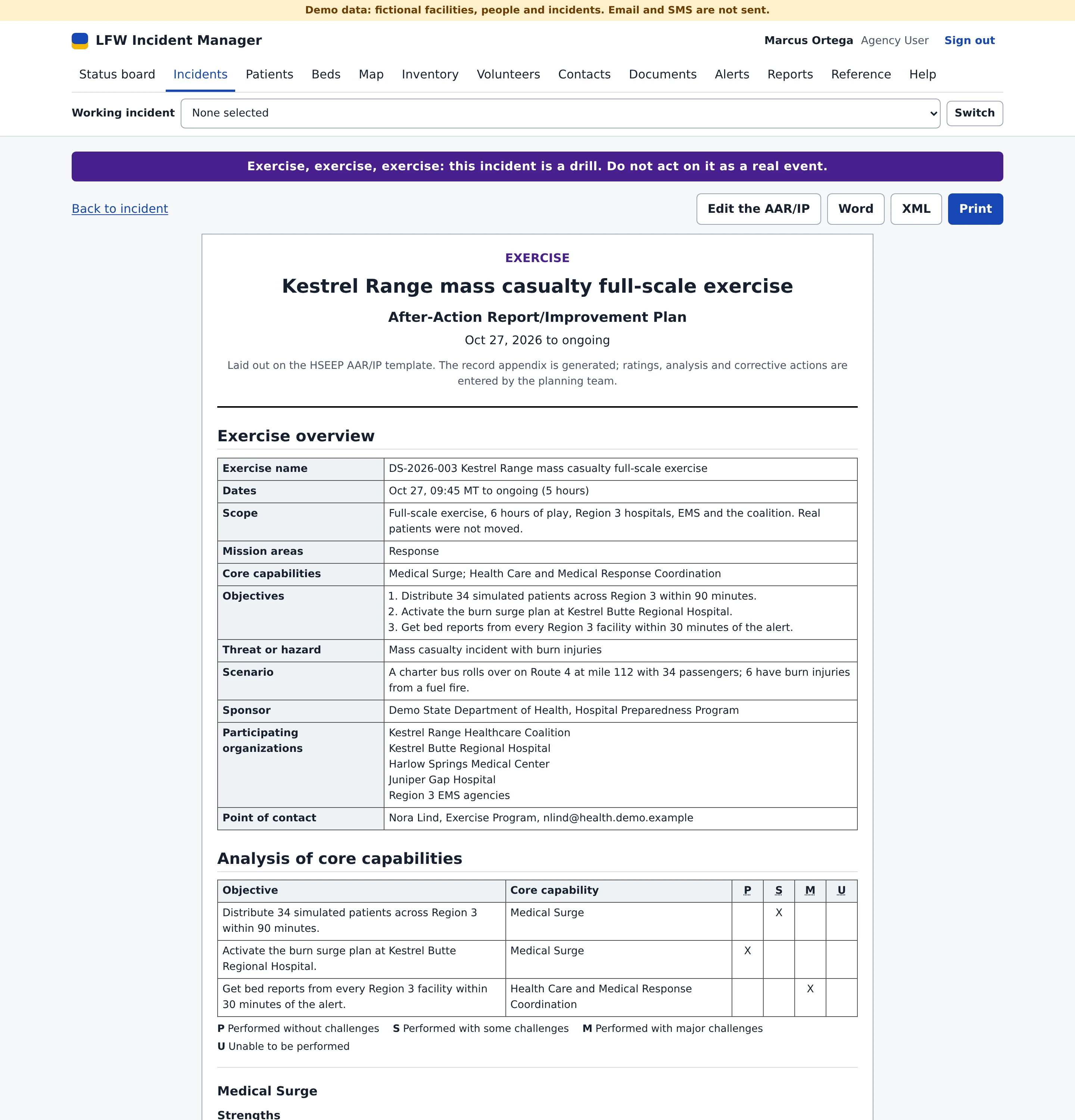
An HSEEP After-Action Report and Improvement Plan for a fictional mass casualty exercise: the exercise overview, objectives and participating organizations, and each objective's core capability rated P, S, M or U, with Word, XML and Print buttons.

One record under every incident.

Every screen reads and writes the same incidents, people, facilities and stock.

One set of people
Staff, facility users and volunteers, each with a role and a region.
One set of facilities
Hospitals, caches and stockrooms, with beds and stock on the same record.
One alert system
Incidents, taskings and polls to users, roles, regions or contact groups.
One audit log
Who, what, before, after and when, chained by SHA-256 and verified on every view.

The LFW platform: your website, forms, sign-in and monitoring. See the platform

In the working demo.

7
ICS forms: 201, 202, 203, 204, 205A, 213 and 214
6
bed categories, by coalition and statewide
15
Emergency Support Functions for positions, taskings and requests
4
export formats for every table: CSV, Excel, Word and XML

A working demonstration with fictional data, not a production system. Accessibility is checked with axe at desktop and phone width on every build; keyboard and screen-reader testing by a person is still needed.

Questions programs ask.

Is it in production anywhere?

Not yet. It is a working demo with fictional data, and we say so in every proposal.

Can hospitals send bed counts from their own systems?

Yes. A token bound to one facility posts bed counts as JSON or CSV, and an OpenAPI document describes every endpoint.

Does staff sign-in use our identity provider?

Yes. Staff sign in through your identity provider. Access needs a mapped group, so a new account gets nothing until someone grants it.

What is not built yet?

Native phone apps. The web app works on phones, and the gaps are listed in every proposal.

Run your next exercise in it.

We walk your duty officers through an incident in the working demo, from the first hour to the after-action report.