LFW Lab Manager
The screening lab, from the card to the released report.
Every specimen is checked at each step before its result is released.
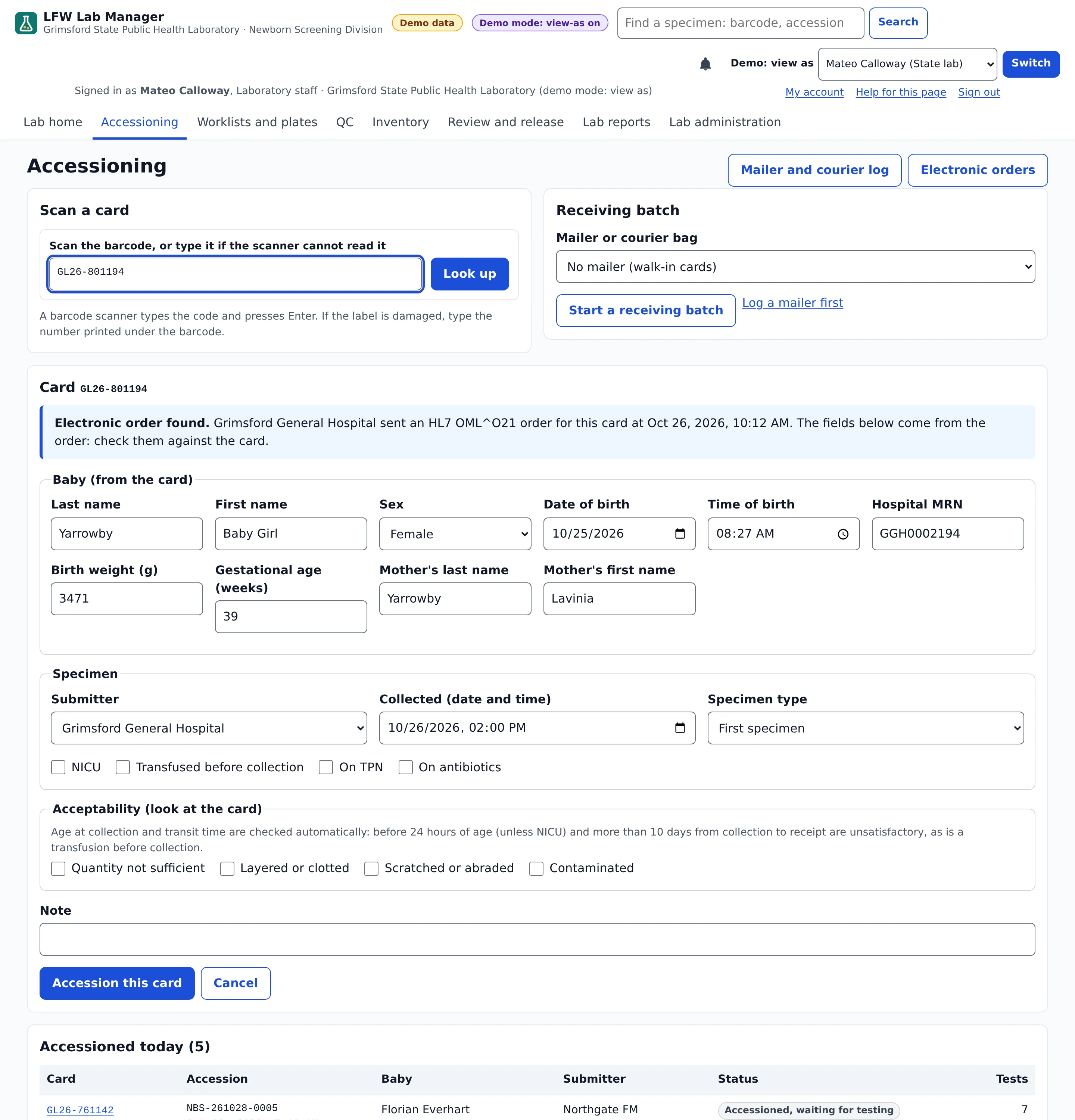
- Cards scanned in against the hospital's order
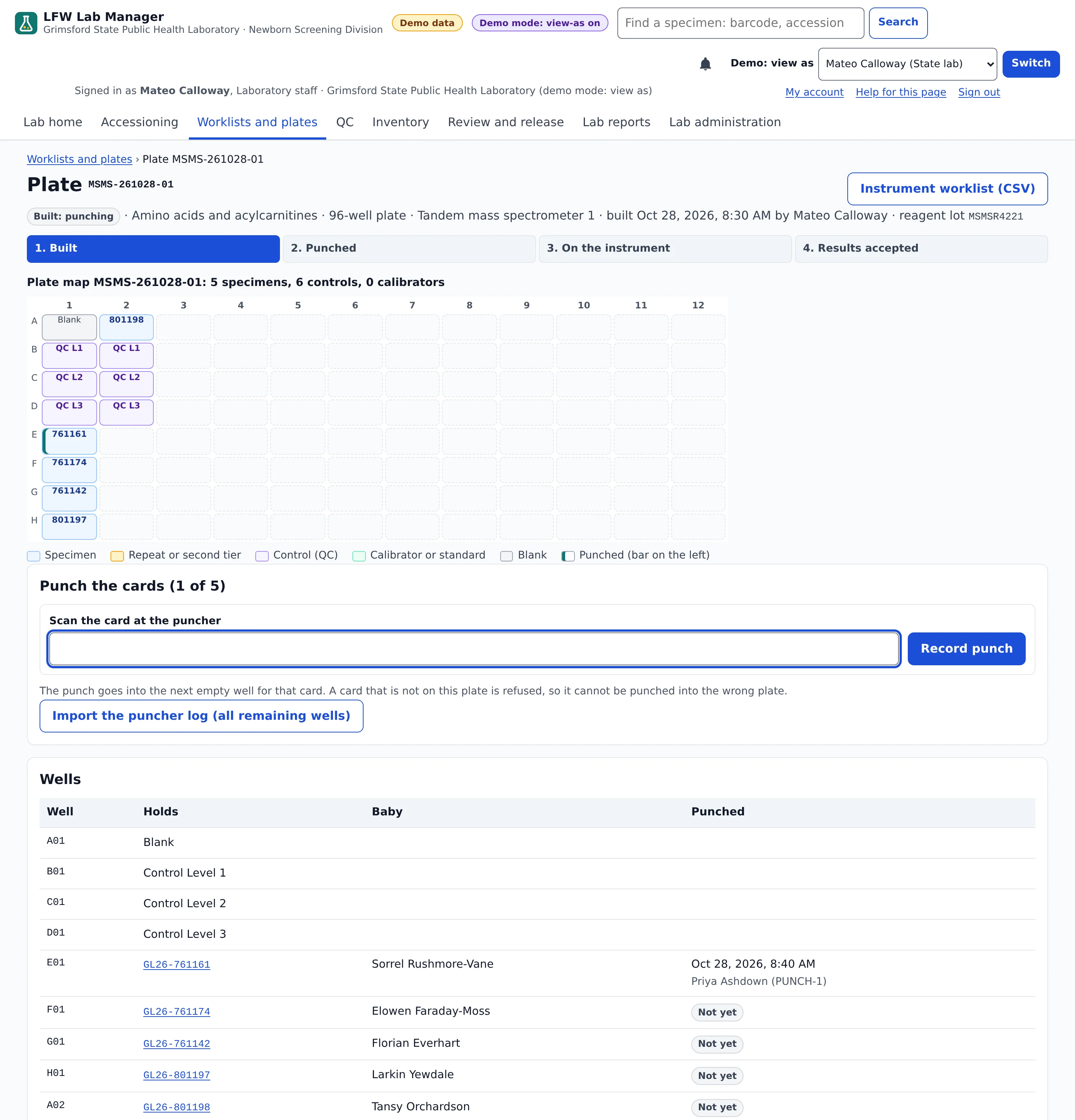
- Plates built and punched
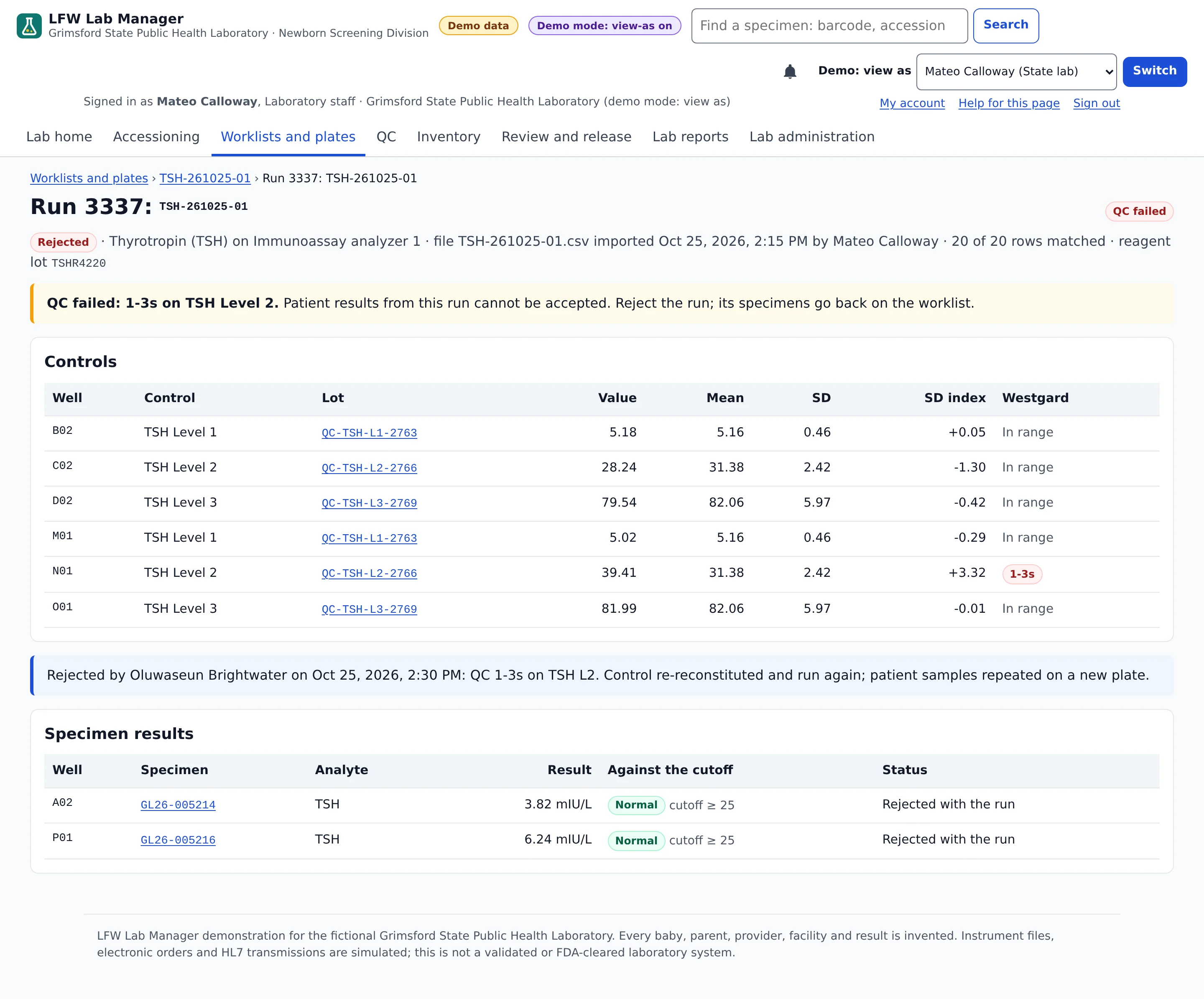
- Instrument files checked against the plate map and QC
- Two people to release a presumptive positive
For newborn screening laboratories · working demo, not in production
See it with sample data.
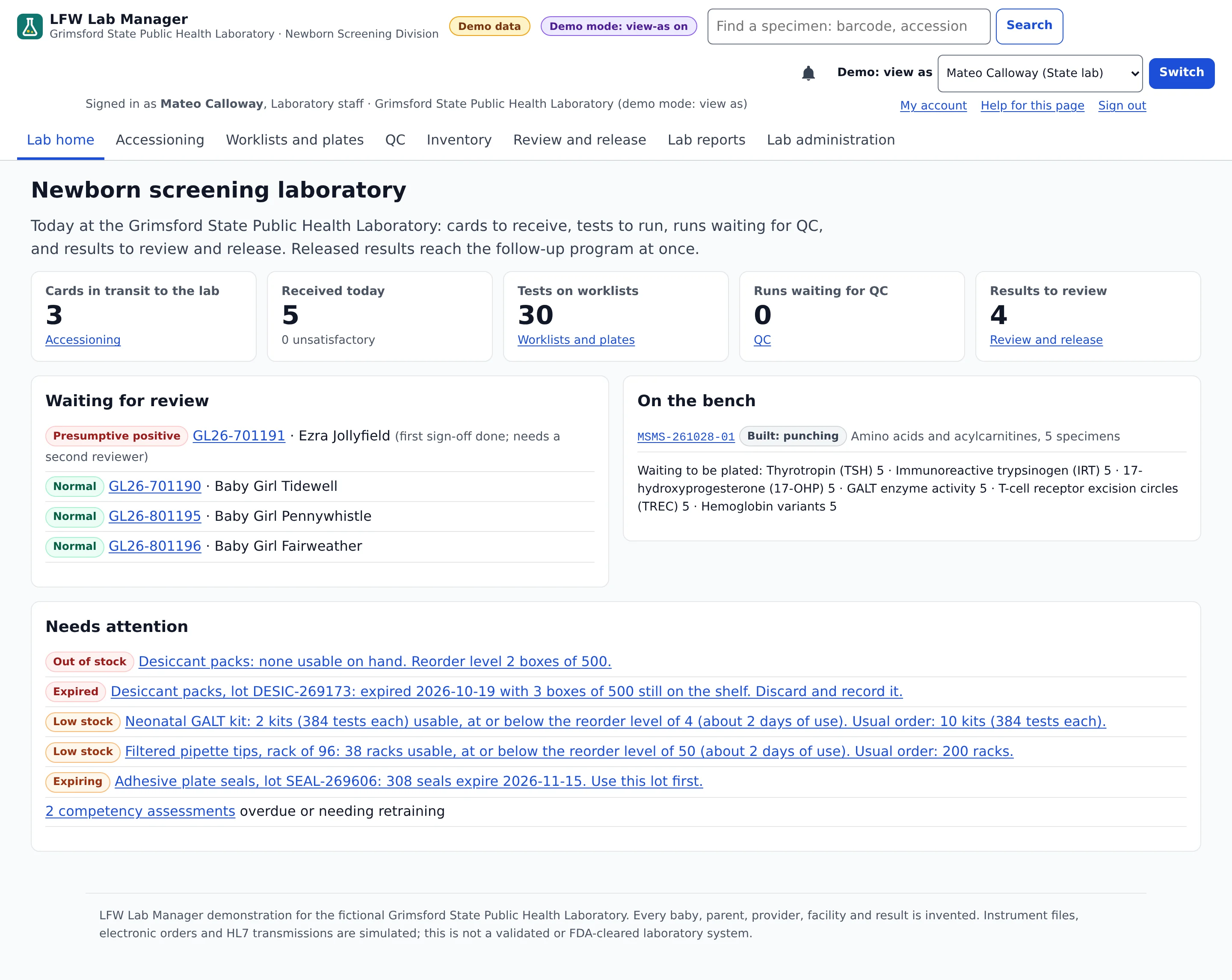
Screens from the working demo, for the fictional Grimsford State Public Health Laboratory. Every baby, specimen, instrument and result is invented, and each screen carries a Demo data label.

Enlarge to view the full screenshot.

Enlarge to view the full screenshot.

Enlarge to view the full screenshot.

Enlarge to view the full screenshot.
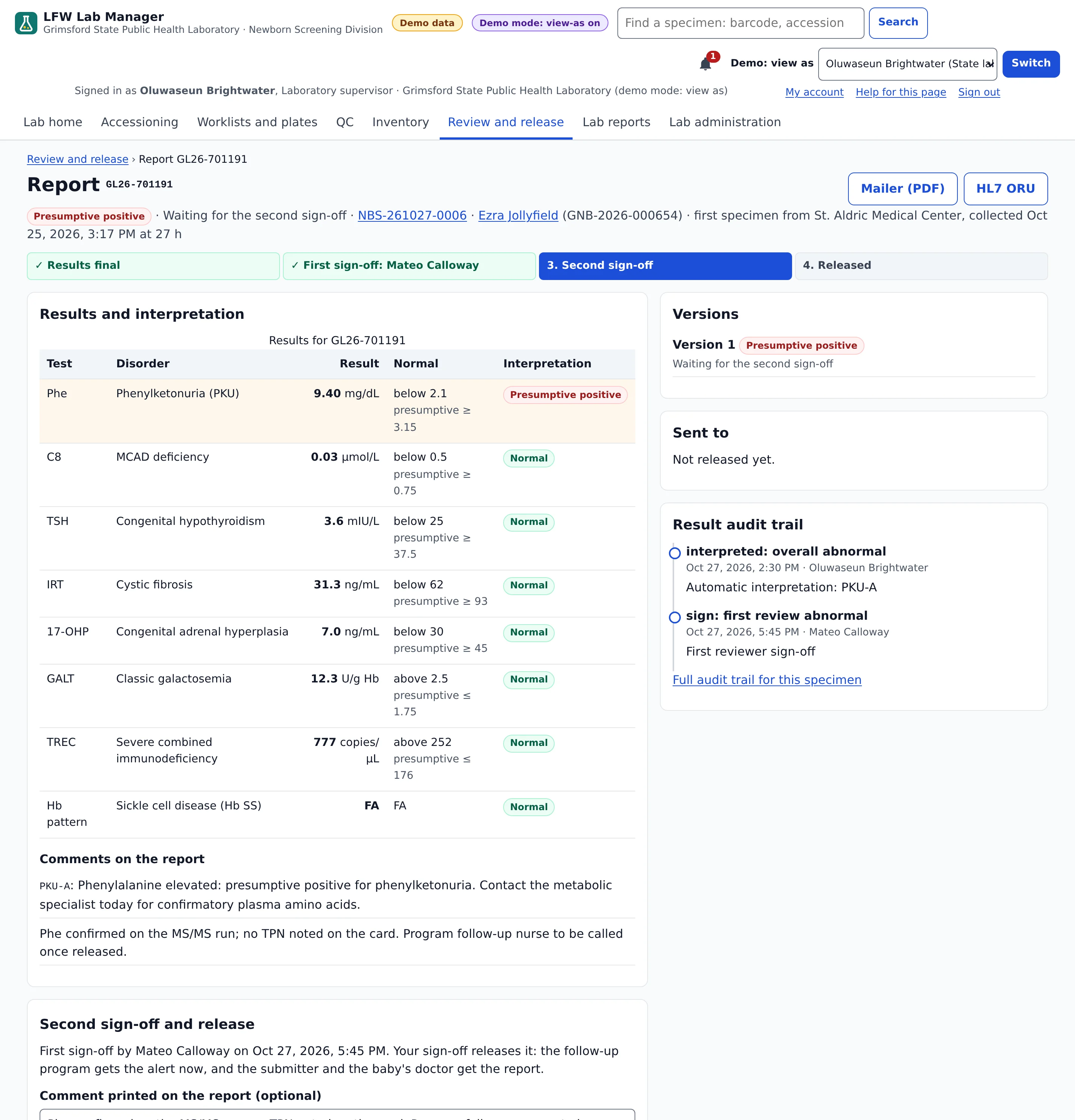

Enlarge to view the full screenshot.
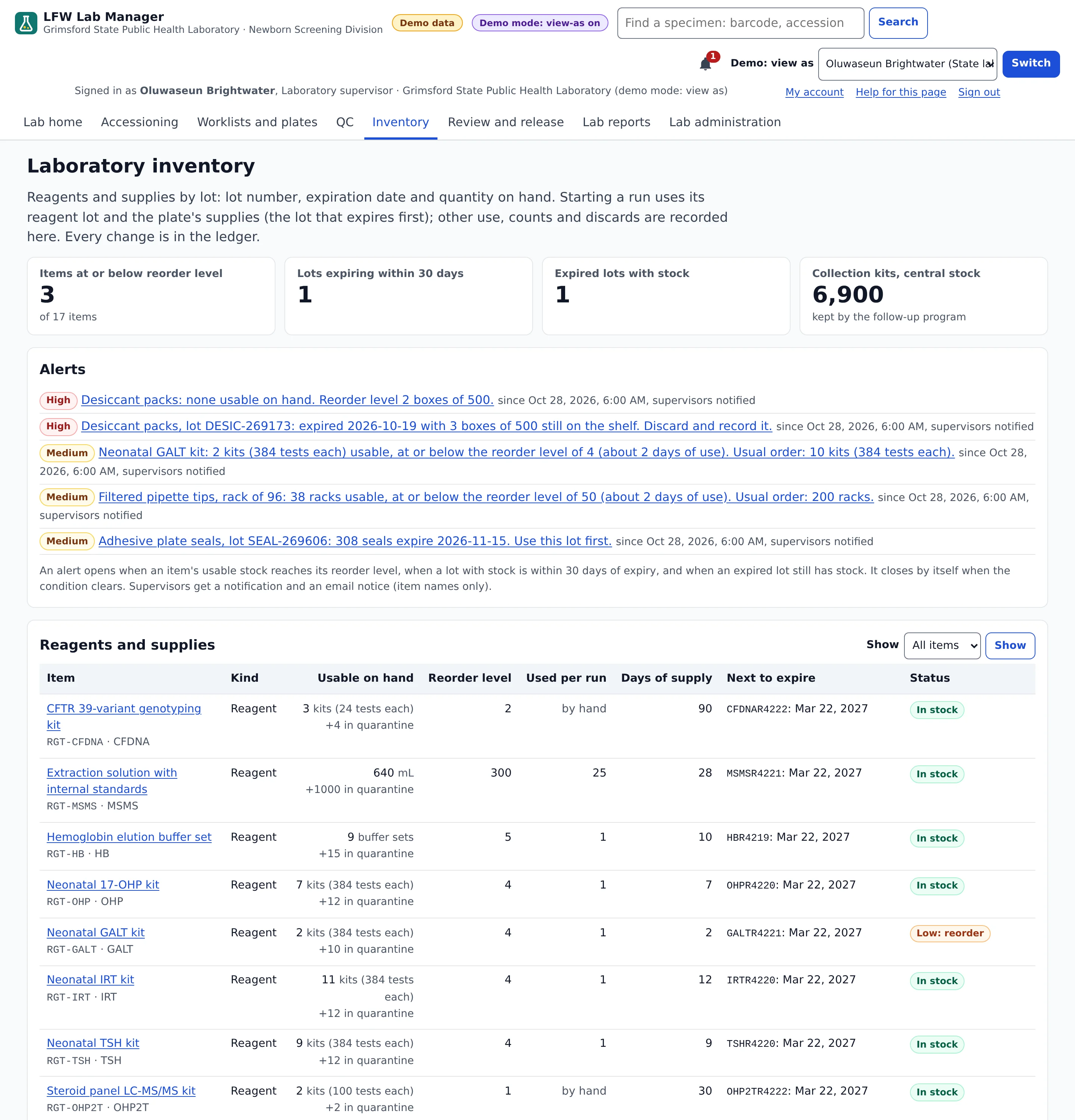

Enlarge to view the full screenshot.
Every step at the bench.
In the same application and database as the follow-up program.
- Accessioning Scan the card, and the hospital's HL7 order fills it in. Age at collection, transit time and transfusion are checked automatically, with the analyst's visual checks.
- Panels, worklists and plates The panel follows the specimen type and age. Plates of 96 or 384 wells place calibrators, controls and specimens, and the puncher scan refuses a card that is not on the plate.
- Instrument result files MS/MS, immunoassay, qPCR for TREC and hemoglobin HPLC files, each matched to its well. A file for another plate or a mismatched sample is refused.
- QC on the Westgard rules Every control value gets an SD index against its lot. A run that breaks a rejection rule cannot be accepted, and Levey-Jennings charts come with a table view.
- Two people for a positive A presumptive positive needs a first reviewer and a different supervisor. A correction is a new version with a reason and two sign-offs; the old one stays readable.
- Reagents and supplies Lots with quantities and expiration dates. A run uses its reagent lot and plate supplies first-expiring first, and low stock or expiring lots raise alerts.
Results out.
- Mailer and HL7 The result mailer as a PDF, stored as sent, and an HL7 v2.5.1 ORU^R01 to the submitter with an OBX per analyte and LOINC codes where shown.
- A results portal Each hospital sees the specimens it sent and the babies born there. A practice sees its own patients.
- Lab dashboards Turnaround by stage with medians and 90th percentiles, unsatisfactory rates by submitter, positives by disorder and QC by assay.
- A result audit trail Every interpretation, manual result, sign-off, release and correction, with who, when, the old and new value and the reason. The database refuses edits to it.
How it fits with the other two products.
- LFW Lab Manager: the laboratory, from the card to the released report.
- LFW Newborn Screener: the follow-up program, in the same database. Release raises the follow-up alert at once, with no interface between them.
- LFW Referral Tracker: community referrals that a partner closes with what happened.
- On its own: Lab Manager also sends results by HL7 to another follow-up system.
Standards.
- HL7 v2.5.1
- OML^O21 and ORM^O01 orders in from hospitals, ORU^R01 results out with acknowledgments.
- FHIR R4
- Read-only Patient, Observation and ServiceRequest through LFW Newborn Screener.
- LOINC
- On results where shown, and on the hearing and CCHD results in follow-up, such as 59418-4 for post-ductal oxygen saturation.
- Files
- Worklists to the instrument as CSV; results back as the instrument's export file.
Who sees what.
- Laboratory staff
- Accessioning, worklists and plates, instrument runs, QC and the first review.
- Laboratory supervisor
- Everything staff do, plus the second sign-off, corrected reports and laboratory configuration.
- Hospitals and practices
- Released reports for their own specimens and patients, in the results portal.
- Sign-in
- Password and an authenticator code, or SAML 2.0 single sign-on, with lockout and an idle timeout.
- Audit trail
- The result audit trail, plus every view, change and export in the system audit trail.
What it replaces.
A separate laboratory information system for newborn screening, and the interface that carries its results to the follow-up program.
Try the live demo.
Lab Manager and Newborn Screener in one demo, for the fictional Grimsford State Public Health Laboratory and Department of Health. The data is reset every night.
- Laboratory staff
- Scan cards, build and punch plates, import instrument files and give the first review.
- Laboratory supervisor
- Give the second sign-off on a presumptive positive, correct a report and manage inventory.
- Hospital
- Open the results portal as a fictional birth hospital and see only its own reports.
Access is a personal link, such as lfw.com/demo/grimsford-4821, that opens your own private copy of the demo. Nothing your team enters there is shown to anyone else. Links are sent the same business day.
Where it stands.
A working demo with fictional data. It has not been validated under CLIA, it is not FDA-cleared and no laboratory uses it. It reads instrument result files and has no instrument drivers. Hospital orders and HL7 transmissions are simulated; live connections and validation are done with the laboratory during implementation.
What it needs.
- Who it is for
- State and territorial public health laboratories that run newborn screening.
- Your records
- Your laboratory owns its data and can export it at any time.
- Accessibility
- The laboratory pages are among the 251 demo pages that pass automated axe accessibility checks at desktop and phone widths.
- Release
- A working demo with fictional data, not in production. No laboratory runs it yet.
Name it in your RFP.
When a solicitation asks for a named newborn screening laboratory product, use this name exactly:
LFW Lab ManagerPublisher: LFW.com LLC, doing business as LFW.
Ask for a demo or a quote.
Tell us how cards, instruments and results move through your laboratory today. We reply within one business day.