LFW Platform · Youth sports leagues
League registration, schedules and standings.
Players register and pay, staff place them on teams, and families follow the schedule on a public page.
Used by Parks and recreation departments, recreation districts and school districts.
How it works.
From sign-up to the last game of the season.
- 1 Families
Register each player
Players register with resident or non-resident fees and pay at registration. Families add allergies, medications and an emergency contact.
- 2 Captains
Register a team
A captain registers the team, pays the team fee or a deposit and gets an invite link for players. The team name shows publicly once it is approved.
- 3 Your staff
Place players on teams
Staff place individual players, or captains invite them with a link. Roster limits and a lock date keep teams settled.
- 4 LFW and your staff
Build the schedule
LFW generates a round-robin schedule with no field or team double-booked, and your staff review it before publishing. Staff assign officials, with overlap and conflict checks.
- 5 Your staff
Handle the weather
Close a field or postpone a day’s games in one step. Public schedules show the change at once.
No calling every coach to say which games moved.
- 6 Coaches and families
Scores and standings
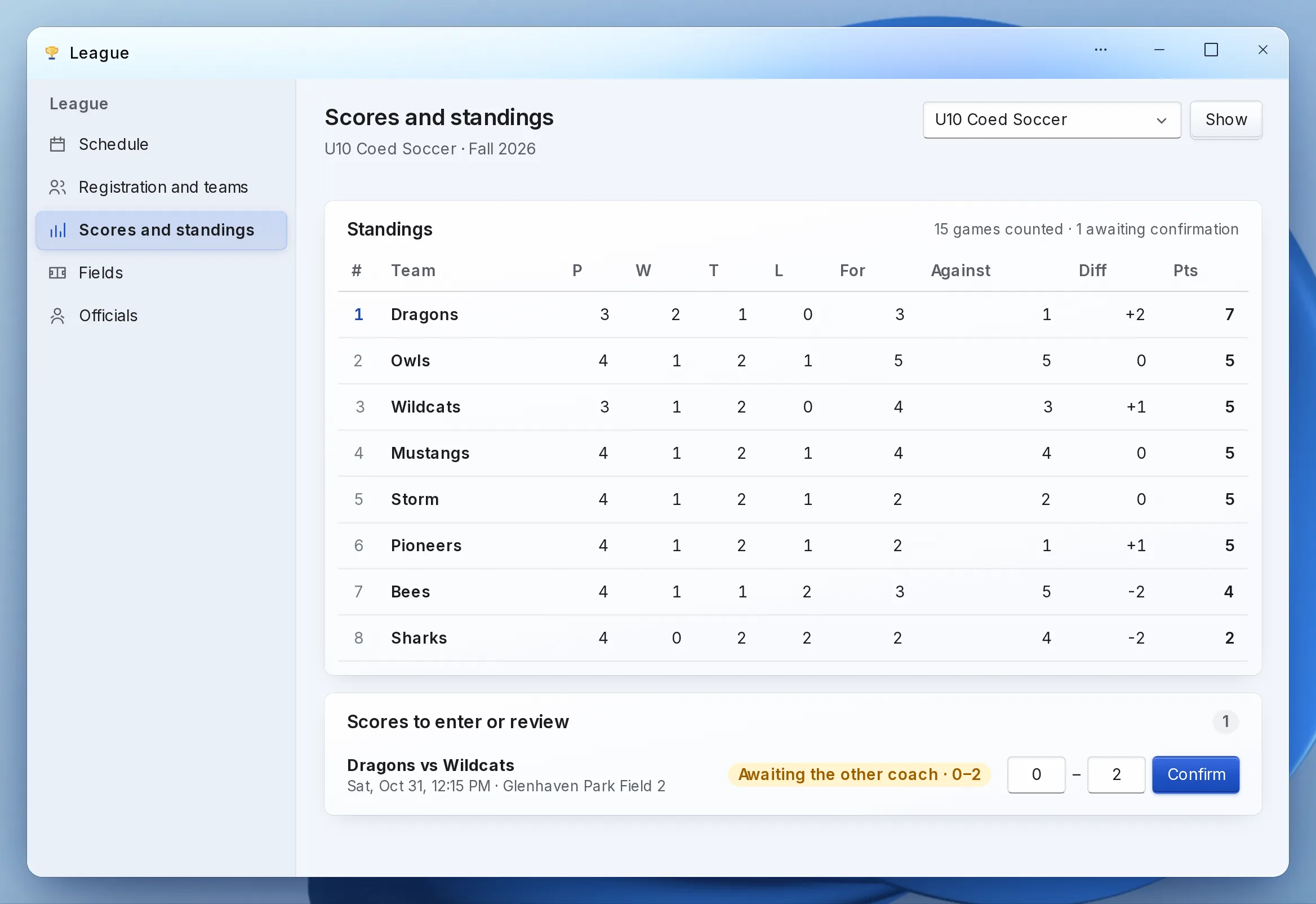
A coach reports the score, the other coach confirms it, and staff settle disputes. Standings count confirmed scores only, on a public page with a calendar feed for each team, and on your own website with one script tag.
What it looks like
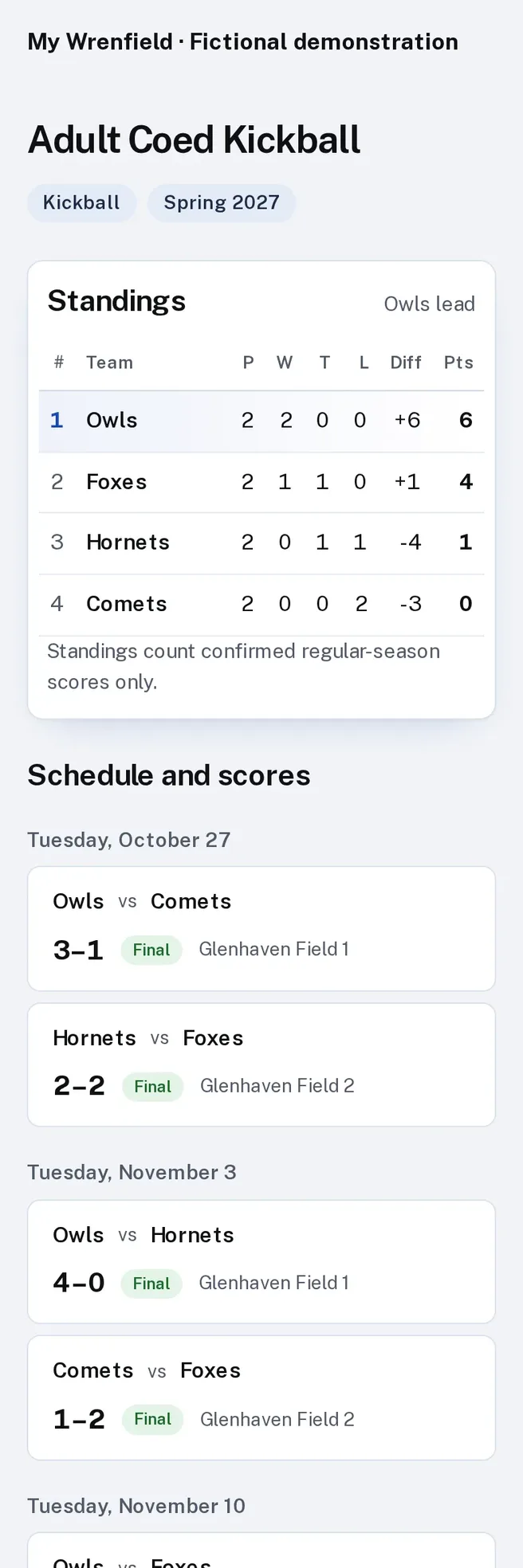
Enlarge to view the full screenshot.
What your staff control.
The rules of your league, kept by the software.
-
Fields and blackout dates
Schedules respect field slots, blackout dates and closures.
-
Coach clearances
A coach without a current background check on record cannot be assigned.
-
Health information
Coaches see only their own team’s health details, and every look is logged.
-
Playoffs
Single or double elimination brackets, seeded from the standings.
Setting it up.
LFW sets up the season with you.
What you bring
- Your divisions, ages and fees
- Your fields and the times each is available
- Blackout dates
- Your officials and coaches
What we do
- Set up the divisions, fees and health questions
- Generate the schedule for your review
- Publish the public schedule and standings pages
- Show staff how to handle closures, rainouts and scores
What it doesn’t do yet.
- Rainout emails and texts go out once LFW turns on sending for your institution. The public schedule updates at once.
If you need one of these, say so in your setup request. We’ll tell you what the Platform supports and discuss the gap.
Questions.
Can coaches report scores?
Yes. The other coach confirms, and staff settle any dispute. Standings count confirmed scores only.
Can families subscribe to the schedule?
Yes. Each team has a calendar feed, and the public page shows postponed games at once.
Can parents volunteer, and are concussion forms kept?
Yes. Residents sign up for volunteer shifts and cancel their own, and see their background-check status. Parents sign the concussion acknowledgment for each child with the exact wording kept, and a player needs return-to-play clearance before going back.
Do you run background checks?
Checks run through the screening provider your institution chooses, and coaches without a current check cannot be assigned.
Where does the money go?
Into your institution’s own Stripe account, in your name. Stripe’s own processing fees apply.
Do we have to replace our website?
No. The public uses it from the website you have, through a link to a hosted page or an embed. WordPress and Drupal sites can also install a connector.
Who sets it up?
LFW sets up your workspace and configures the workflow with your staff. Staff build their own forms and import existing records from a spreadsheet.
How do we get a price?
Send a written setup request or ask for a written quote. We reply within one business day. A call is optional.
Start with next season.
Send a written setup request. A demonstration is there if you want one.
Need a quote for purchasing? Request a written quote.